Java Type Casting - Widening and Narrowing with Examples
⏱️ 8 min read • Beginner Level • Lesson 17
Completed on . You can revise this lesson or continue to the next topic.
Type casting in Java means converting a value from one data type to another data type. It is commonly used when assigning values between different numeric types or when working with expressions.
Before learning type casting, you should understand Java variables, Java data types, and Java input and output.
What is Type Casting in Java?
Type casting is the process of converting one data type into another.
For example, converting an int value into a double,
or converting a double value into an int.
-
Type casting helps convert values between compatible data types.
-
Java supports automatic casting and manual casting.
-
Type casting is mostly used with numeric data types such as
byte,short,int,long,float, anddouble.
Types of Type Casting in Java
Java type casting is mainly divided into two types:
1. Widening Casting
Converting a smaller data type into a larger data type automatically. It is also called implicit casting.
2. Narrowing Casting
Converting a larger data type into a smaller data type manually. It is also called explicit casting.
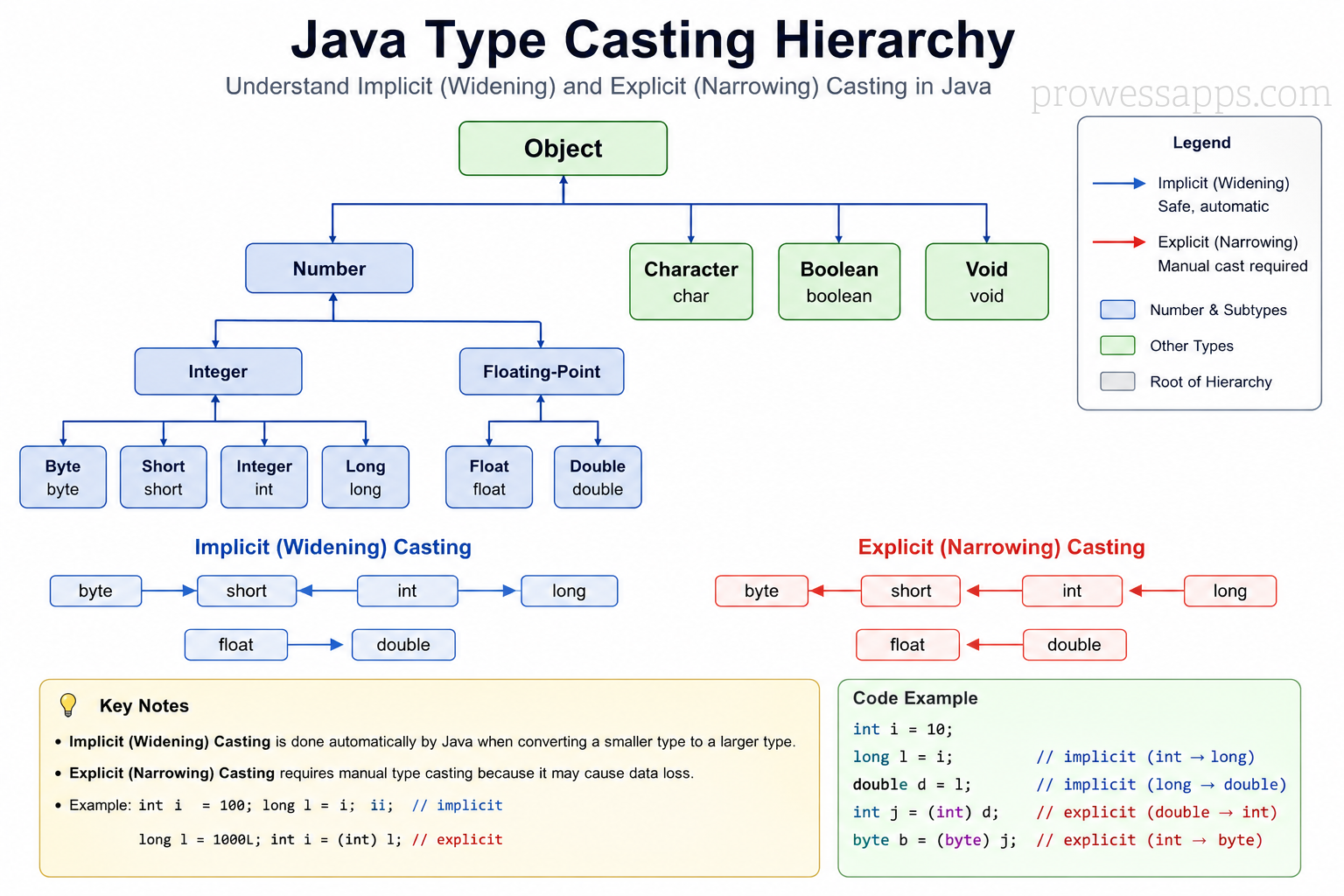
Java Type Conversion Hierarchy
Widening Type Casting in Java
Widening casting happens when a smaller data type is converted into a larger data type. Java performs widening casting automatically because there is no risk of data loss.
byte → short → int → long → float → double
public class WideningCastingExample {
    public static void main(String[] args) {
        int number = 100;
        double result = number; // automatic casting: int to double

        System.out.println("Integer value: " + number);
        System.out.println("Double value: " + result);
    }
}
Output:
Integer value: 100
Double value: 100.0
Narrowing Type Casting in Java
Narrowing casting happens when a larger data type is converted into a smaller data type. Java does not perform narrowing automatically because it may cause data loss. Therefore, narrowing casting must be done manually using parentheses.
smallerType variable = (smallerType) largerValue;public class NarrowingCastingExample {
public static void main(String[] args) {
float price = 99.75f;
int amount = (int) price; // manual casting: float to int
System.out.println("Flaot price: " + amount);
System.out.println("Integer amount: " + amount);
double value = 99.99;
int number = (int) value; // manual casting: double to int
System.out.println("Double value: " + value);
System.out.println("Integer value: " + number);
}
}Output:
Float price: 99.75
Integer amount: 99.75
Double value: 99.99
Integer value: 99
double is converted to an
int, the decimal part is removed. It is not rounded.
Real-World Use of Type Casting
Type casting is commonly used when working with calculations, user input, APIs, databases, and file processing.
- Converting user-entered integers to doubles for calculations.
- Storing average marks as decimal values.
- Converting prices from double to int when decimals are not required.
- Processing Unicode values of characters.
- Working with mathematical expressions involving multiple data types.
Java Type Conversion Order
Java follows a natural order for widening numeric conversions. Smaller types can be automatically converted to larger types.
| Conversion Type | Direction | Automatic? |
|---|---|---|
| Widening | byte → short → int → long → float → double |
Yes |
| Narrowing | double → float → long → int → short → byte |
No, manual cast required |
Type Casting in Expressions
When different numeric types are used in an expression, Java may automatically promote smaller types to larger types before calculation.
public class ExpressionCastingExample {
    public static void main(String[] args) {
        int a = 10;
        double b = 5.5;

        double result = a + b; // int is promoted to double

        System.out.println(result);
    }
}
Output:
15.5
char and int Casting in Java
In Java, char values are internally stored as Unicode numbers.
Because of this, a char can be converted to an int
to get its Unicode value.
public class CharCastingExample {
    public static void main(String[] args) {
        char ch = 'A';
        int unicodeValue = ch;

        System.out.println("Character: " + ch);
        System.out.println("Unicode value: " + unicodeValue);
    }
}
Output:
Character: A
Unicode value: 65
You can also cast an integer value back to a character.
public class IntToCharCasting {
    public static void main(String[] args) {
        int number = 66;
        char ch = (char) number;

        System.out.println(ch);
    }
}
Output:
B
byte, short and int Casting
In Java expressions, byte and short values are promoted
to int before calculation. This is a common interview question.
public class ByteShortPromotion {
    public static void main(String[] args) {
        byte a = 10;
        byte b = 20;

        // byte c = a + b; // Error: result is promoted to int

        int result = a + b;
        byte c = (byte) (a + b);

        System.out.println(result);
        System.out.println(c);
    }
}
Output:
30
30
byte and
short produce an int result.
Loss of Data in Narrowing Casting
Narrowing casting can cause data loss because a larger data type may contain a value that cannot fit into a smaller data type.
public class DataLossExample {
    public static void main(String[] args) {
        int number = 130;
        byte value = (byte) number;

        System.out.println(value);
    }
}
Output:
-126
byte is from -128 to 127.
Since 130 is outside this range, overflow occurs and the result becomes unexpected.
Common Mistakes in Java Type Casting
-
Assigning a
doubledirectly to anintwithout casting. -
Expecting
doubletointcasting to round the number. -
Forgetting that
byteandshortare promoted tointin expressions. - Ignoring possible data loss during narrowing casting.
- Assuming all conversions are automatic.
public class CommonCastingMistake {
    public static void main(String[] args) {
        double price = 99.99;

        // int amount = price; // Error: possible lossy conversion

        int amount = (int) price; // Correct explicit casting

        System.out.println(amount);
    }
}
Output:
99
Java Type Casting Summary Table
| Type Casting | Also Called | Conversion | Example |
|---|---|---|---|
| Widening Casting | Implicit Casting | Small type to large type | int → double |
| Narrowing Casting | Explicit Casting | Large type to small type | double → int |
| char to int | Unicode Conversion | Character to Unicode number | 'A' → 65 |
| byte/short promotion | Numeric Promotion | byte and short become int in expressions |
byte + byte → int |
- Type casting means converting one data type into another.
- Widening casting is automatic and converts a smaller type to a larger type.
- Narrowing casting is manual and converts a larger type to a smaller type.
- Narrowing casting can cause data loss.
charcan be converted tointto get its Unicode value.byteandshortvalues are promoted tointin expressions.
Interview Questions ⭐
🧠 Test your understanding with a quick quiz
🚀 Quick Knowledge Check
Topic: Type-casting | Language: Java
Q1. Which statement is correct about narrowing casting in Java?
Q2. What is type casting in Java?
Q3. What happens when a value outside the byte range is cast to byte?
int x = 130;
byte y = (byte) x;
System.out.println(y);Q4. Why does the following code give a compiler error?
byte a = 10;
byte b = 20;
byte c = a + b;Q5. What will be the output of the following code?
int num = 100;
double result = num;
System.out.println(result);Q6. Which of the following is an example of narrowing casting?
double price = 99.99;
int amount = (int) price;Q7. Which of the following is an example of widening casting?
int a = 10;
double b = a;Q8. What will be the output of this code?
double value = 45.89;
int number = (int) value;
System.out.println(number);Q9. Which type of casting is performed automatically by Java?
Q10. What will be the output of the following code?
char ch = 'A';
int value = ch;
System.out.println(value);🎉 Great job! Continue learning Java step by step.
Have you completed this lesson?
Mark this lesson as completed to track your learning progress. To keep track across devices, please login and save your learning progress.

Discussion
Ask questions, share suggestions, or discuss this lesson.