Data Types in Java
⏱️ 7 min read • Beginner Level • Lesson 11
Completed on . You can revise this lesson or continue to the next topic.
Java data types define what kind of data a variable can store. In this tutorial, you'll learn primitive and non-primitive data types, their sizes, ranges, default values, and practical examples.
Before learning data types, you should understand variables in Java since every variable must have a data type.
What are Data Types in Java?
Data types in Java define the type of data that a variable can store. They also determine the size, range, and operations that can be performed on that data.
-
Java has two broad categories: Primitive and Non-Primitive (Reference) data types.
-
Class fields (instance/static) get default values automatically, but local variables must be initialized before use.
-
Primitive values are stored directly; non-primitives store references to objects.
-
Data types determine memory usage and valid operations.
-
Choosing the right data type optimizes memory usage and performance.
Primitive Data Types
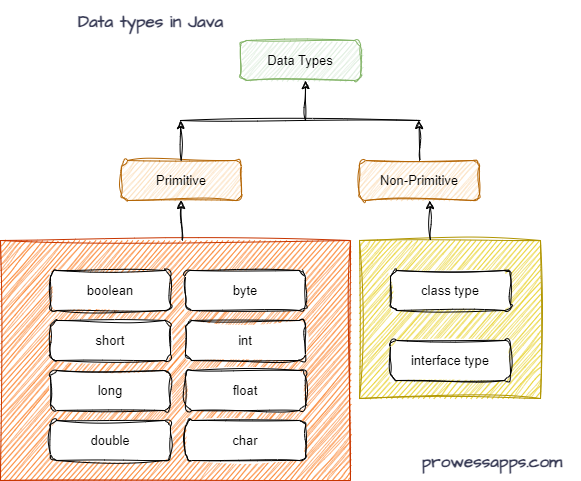
Java provides eight primitive data types. They are predefined by the language and represented by reserved keywords.
| Data Type | Size | Default Value (for fields) | Range |
|---|---|---|---|
| boolean | 1 bit | false | true or false |
| char | 2 bytes | '\u0000' | 0 to 65,535 (Unicode) |
| byte | 1 byte | 0 | -128 to 127 |
| short | 2 bytes | 0 | -32,768 to 32,767 |
| int | 4 bytes | 0 | -2,147,483,648 to 2,147,483,647 |
| long | 8 bytes | 0L | -9,223,372,036,854,775,808 to 9,223,372,036,854,775,807 |
| float | 4 bytes | 0.0f | ±3.4E38 (approx) |
| double | 8 bytes | 0.0d | ±1.7E308 (approx) |
Example: Default Values
public class DefaultValuesTest {
    // Instance (non-static) primitives
    byte b; short sh; int a; long l;
    float f; double d; char ch; boolean bool;

    // Static field
    static int x;

    // Reference type
    String s;

    void showValues() {
        System.out.println("Default Value of byte b : " + b);
        System.out.println("Default Value of short sh : " + sh);
        System.out.println("Default Value of int a : " + a);
        System.out.println("Default Value of long l : " + l);
        System.out.println("Default Value of float f : " + f);
        System.out.println("Default Value of double d : " + d);
        System.out.println("Default Value of char ch : " + ch);
        System.out.println("Default Value of boolean bool : " + bool);
        System.out.println("Default Value of static int x : " + x);
        System.out.println("Default Value of reference String s : " + s);
    }

    public static void main(String[] args) {
        DefaultValuesTest ob = new DefaultValuesTest();
        ob.showValues();
    }
}
Output:
Default Value of byte b : 0
Default Value of short sh : 0
Default Value of int a : 0
Default Value of long l : 0
Default Value of float f : 0.0
Default Value of double d : 0.0
Default Value of char ch :
Default Value of boolean bool : false
Default Value of static int x : 0
Default Value of reference String s : null
- Primitive instance variables automatically receive default values.
- Reference variables receive
null. - Local variables do not get default values.
Non-Primitive Data Types
Non-primitive (reference) data types are used to store references to objects. Unlike primitive types, they do not store actual values directly in memory.
Examples include String, arrays, classes, and interfaces.
These types can be used to call methods, store collections of data, and work with complex structures.
Common Non-Primitive Data Types
- String
- Arrays
- Classes
- Interfaces
- Enums
- Collections (ArrayList, HashMap, LinkedList)
Primitive vs Non-Primitive Data Types
| Primitive Data Types | Non-Primitive Data Types |
|---|---|
| Store actual values | Store references to objects |
| Fixed memory size | Variable memory size |
| Built into Java language | Created using classes and interfaces |
| Cannot call methods | Can call methods |
| Faster access | Slightly slower access |
| Examples: int, float, char | Examples: String, Array, Class |
How Data is Stored in Memory
Primitive variables store actual values directly, whereas non-primitive variables store references to objects.
public class MemoryExample {

    public static void main(String[] args) {

        int age = 25;

        String name = "John";

        System.out.println(age);
        System.out.println(name);
    }
}
agestores the value 25 directly.namestores a reference to a String object.
Notes
- Default values apply to fields (instance/static) only; local variables must be initialized.
booleanhas only two values:trueandfalse(no 0/1 shortcuts).- The default for a reference (e.g.,
String) isnull.
- Java has 8 primitive data types.
- Primitive types store actual values.
- Reference types store object references.
- Local variables do not receive default values.
- Selecting the correct data type improves memory efficiency.
- Java data types define what kind of data variables can store.
- There are two types: primitive and non-primitive.
- Primitive types include 8 built-in data types.
- Default values apply to instance and static variables.
Interview Questions ⭐
🧠 Test your understanding with a quick quiz
🚀 Quick Knowledge Check
Topic: Data-types | Language: Java
Q1. Which of the following is NOT a primitive data type in Java?
Q2. What is the default value of a boolean variable in Java?
Q3. What will be the output of this code?
double a = 10/4;
System.out.println(a);Q4. Which data type is used to store a single character in Java?
Q5. What will be the output of the following code?
int x = 130;
byte y = (byte) x;
System.out.println(y);🎉 Great job! Continue learning Java step by step.
Have you completed this lesson?
Mark this lesson as completed to track your learning progress. To keep track across devices, please login and save your learning progress.

Discussion
Ask questions, share suggestions, or discuss this lesson.