Java Packages – Built-in & User-defined Packages in Java
⏱️ 22 min read • Beginner Level • Lesson 53
Completed on . You can revise this lesson or continue to the next topic.
Packages in Java group related classes, interfaces, enums, records, annotations, and sub-packages under meaningful namespaces.
Packages help organize large applications, reduce class-name conflicts, support access control, and make code easier to locate and maintain. In this lesson, you will create a package, compile it, import its classes, use fully qualified names, work with static imports, and understand package naming rules.
What is a Package in Java?
A package is a named namespace used to organize related Java types. A type's package becomes
part of its complete identity. For example, java.util.Date and
java.sql.Date are different classes even though both have the simple name
Date.
Real-World Analogy
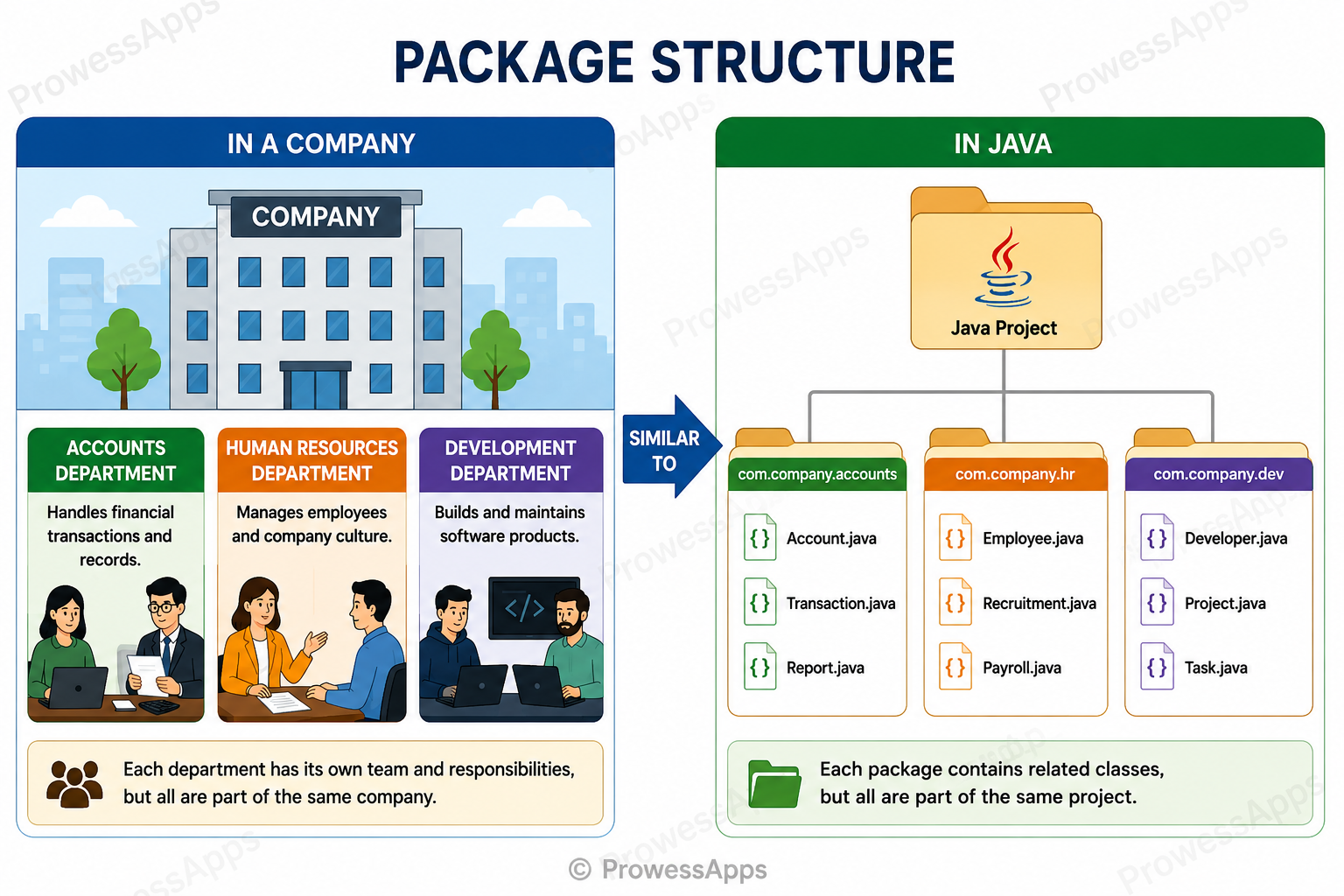
Imagine a company with separate departments such as Accounts, Human Resources, and Development. Each department groups people who perform related work. Java packages organize classes in a similar way.
Why Use Packages?
Better Organization
Place related classes in one logical module so developers can locate them quickly.
Avoid Name Conflicts
Two packages can contain classes with the same simple name without becoming the same type.
Access Control
Package boundaries participate in default and protected access rules.
Maintainability
A clear package structure makes applications easier to extend, test, and refactor.
Java Package Syntax
Declare a package with the package keyword. The declaration must be the first
non-comment statement in the source file.
package packageName;

class ClassName {
    // fields, constructors, and methods
}
Explanation
- The
packagekeyword tells the compiler to put the classes in this file insidepackageName. - The package statement must be the very first line of code in your file.
- All classes declared in this file will belong to
packageName.
import, class declaration, or executable statement cannot appear before it.
Types of Java Packages
| Package Type | Meaning | Example |
|---|---|---|
| Built-in package | Provided by the Java platform. | java.util |
| User-defined package | Created by an application developer. | com.prowessapps.demo |
| Unnamed package | Used when no package declaration is present. | Small beginner programs |
Common Built-in Java Packages
| Package | Common Purpose | Example Types |
|---|---|---|
java.lang |
Core language support | String, Math, System |
java.util |
Collections and utilities | ArrayList, Scanner, Random |
java.io |
Stream-based input and output | File, FileReader |
java.nio.file |
Modern file-system operations | Path, Files |
java.time |
Date and time API | LocalDate, LocalDateTime |
java.net |
Networking | URI, URL |
java.lang available by simple name. Sub-packages of java.lang are
not automatically imported.
Create a User-defined Package
The following example creates a reusable public class in com.prowessapps.demo
and then uses it from another class.
Step 1: Create the Package Class
package com.prowessapps.demo;

public class GreetingService {
    public void greet(String name) {
        System.out.println("Welcome, " + name + "!");
    }
}
Step 2: Import and Use the Package Class
import com.prowessapps.demo.GreetingService;

class PackageTest {
    public static void main(String[] args) {
        GreetingService service = new GreetingService();
        service.greet("Ayan");
    }
}
Output:
Welcome, Ayan!
Explanation
GreetingServicebelongs tocom.prowessapps.demo.- The class is
public, so code in another package may use it. - The import makes
GreetingServiceavailable by its simple name. PackageTestcreates the object and callsgreet().
Compile and Run a Java Package
Run these commands from the project directory containing GreetingService.java
and PackageTest.java. The -d option tells javac where
to create the package directory structure for compiled classes.
Compile both files:
javac -d . GreetingService.java PackageTest.javaRun the class containing main():
java PackageTestjava com.prowessapps.app.PackageTest.
Package Folder Structure
Java tools normally organize source and compiled files in directories that mirror the package components.
src/
└── com/
    └── prowessapps/
        └── demo/
            └── GreetingService.java
out/
└── com/
    └── prowessapps/
        └── demo/
            └── GreetingService.class
Fully Qualified Class Name
A fully qualified class name combines the package name and class name. It uniquely identifies a type and can be used without an import statement.
Simple class name: ArrayList
Fully qualified class name:
java.util.ArrayList
class FullyQualifiedNameExample {
    public static void main(String[] args) {
        java.util.ArrayList<String> languages =
                new java.util.ArrayList<>();

        languages.add("Java");
        languages.add("Python");

        System.out.println(languages);
    }
}
Output:
[Java, Python]
Explanation
- Instead of importing the class, we type out its full identity:
java.util.ArrayList. - This allows us to use
ArrayListdirectly without needing animportstatement at the top. - This is extremely useful when resolving naming conflicts (e.g., if you have two classes with the same simple name).
Import Statement
An import declaration lets you refer to an accessible type by its simple name instead of repeating its fully qualified name.
import java.util.ArrayList;

class ImportExample {
    public static void main(String[] args) {
        ArrayList<String> languages = new ArrayList<>();

        languages.add("Java");
        languages.add("Python");

        System.out.println(languages);
    }
}
Output:
[Java, Python]
Explanation
import java.util.ArrayList;tells the compiler to look in thejava.utilpackage for theArrayListclass.- Because of this import, we can just use the short name
ArrayListinside our code instead of its fully qualified name. - This saves time and makes the code much cleaner to read.
Types of Import Declarations
| Import Type | Example | Purpose |
|---|---|---|
| Single-type import | import java.util.Scanner; |
Makes one accessible type available by simple name. |
| Type-import-on-demand | import java.util.*; |
Makes accessible types declared directly in one package available by simple name. |
| Single static import | import static java.lang.Math.PI; |
Makes one accessible static member available by simple name. |
| Static-import-on-demand | import static java.lang.Math.*; |
Makes accessible static members of one type available by simple name. |
Static Import
Static import lets you use accessible static methods and constants without repeatedly writing the declaring class name.
import static java.lang.Math.PI;
import static java.lang.Math.sqrt;

class StaticImportExample {
    public static void main(String[] args) {
        System.out.println(PI);
        System.out.println(sqrt(25));
    }
}
Output:
3.141592653589793
5.0
Explanation
- The
import statickeyword is used to import static members (likePIandsqrt) directly into the file. - Because we imported them statically, we don't have to write
Math.PIorMath.sqrt(25)anymore. - We can just use their names directly (
PIandsqrt), which makes mathematical calculations cleaner.
Unnamed Package
If a source file has no package declaration, its top-level types belong to an unnamed package, informally called the default package.
Java Package Naming Conventions
- Write package components in lowercase.
- Use valid Java identifiers; spaces and hyphens are not allowed.
- Use a reverse-domain prefix to reduce global name conflicts.
- Add descriptive components for the product, layer, or feature.
- Avoid using names that begin with
javaorjavaxfor application packages.
| Package Name | Assessment |
|---|---|
com.prowessapps.java |
Recommended |
com.prowessapps.util |
Recommended |
MyPackage |
Avoid uppercase naming |
java-package |
Invalid because of the hyphen |
Packages and Access Control
Packages are part of Java's access-control system. Members with default access are available only inside the same package. Protected members are available in the same package and also through inheritance under Java's protected-access rules.
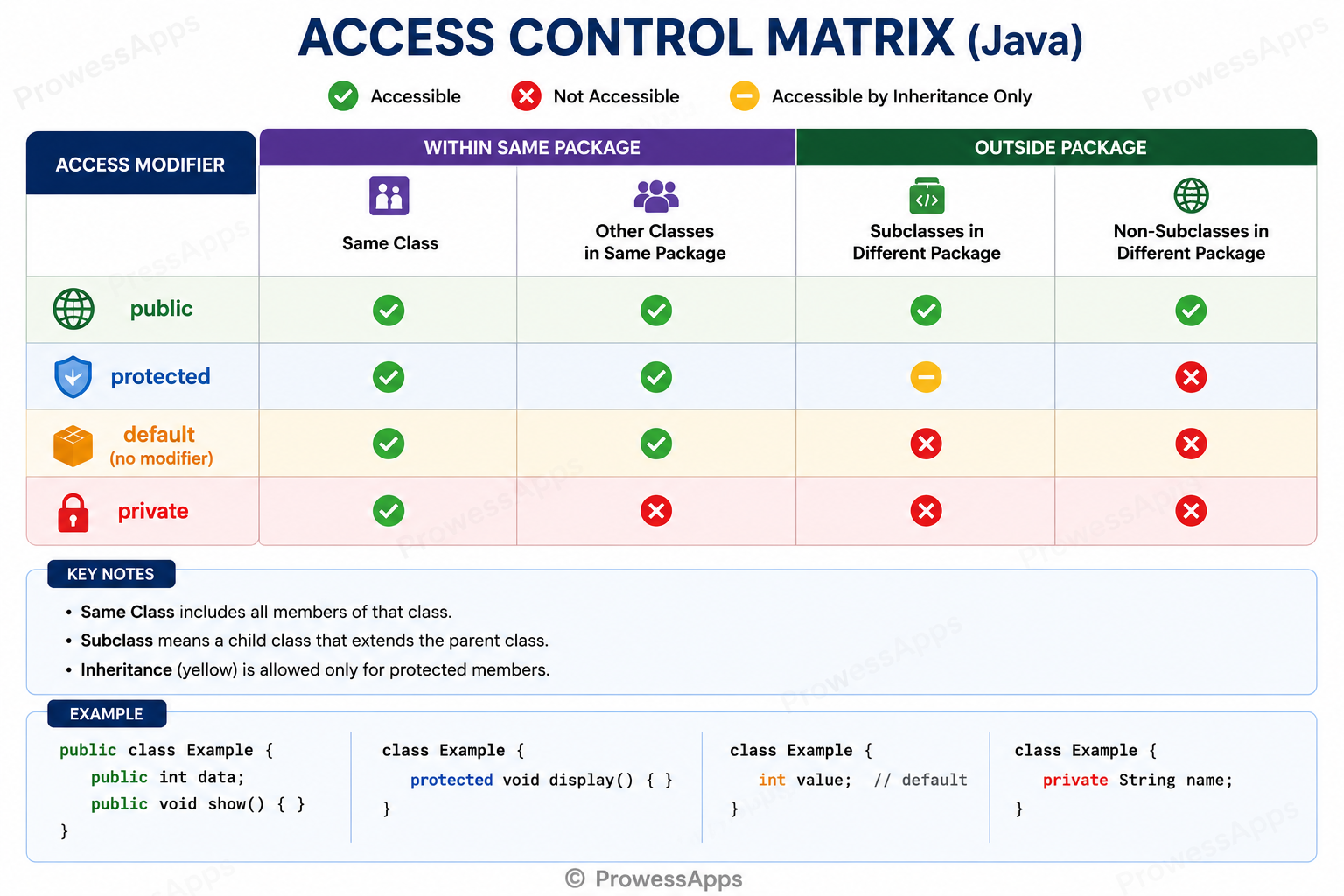
Table Summary
| Modifier | Same Class | Same Package | Subclass in Another Package | Unrelated Class in Another Package |
|---|---|---|---|---|
public |
Yes | Yes | Yes | Yes |
protected |
Yes | Yes | Yes, through inheritance rules | No |
| default | Yes | Yes | No | No |
private |
Yes | No | No | No |
Tricky Cases
1. Can the package declaration appear after an import?
2. Does import java.util.*; include sub-packages?
java.util.concurrent.
3. What if two packages contain a class with the same name?
Use the fully qualified class name for at least one of the conflicting types.
class SameClassNameExample {
    public static void main(String[] args) {
        java.util.Date utilDate = new java.util.Date();
        java.sql.Date sqlDate =
                new java.sql.Date(System.currentTimeMillis());

        System.out.println(utilDate.getClass().getName());
        System.out.println(sqlDate.getClass().getName());
    }
}
Output:
java.util.Date
java.sql.Date
Explanation
- Java provides two different
Dateclasses: one injava.utiland one injava.sql. - We cannot import both
Dateclasses at the top of the file without causing a naming conflict. - To solve this, we don't import them. Instead, we use their fully qualified names every time we create or use them so the compiler knows exactly which one we mean!
4. Is a sub-package automatically part of its parent package?
com.example and com.example.util
are separate packages for imports and access control.5. Can one source file contain multiple package declarations?
Common Mistakes
- Writing an import before the package declaration.
- Using a package name that does not match the project's intended directory structure.
- Assuming an on-demand import includes sub-packages.
- Trying to import two classes with the same simple name.
- Forgetting to make a top-level class public when it must be used from another package.
- Overusing wildcard or static imports and reducing readability.
- Placing production classes in the unnamed package.
- Running a packaged main class without its fully qualified name.
- Packages give Java types organized namespaces.
- The package declaration must appear before imports and type declarations.
- Built-in packages come from Java; user-defined packages are created by developers.
- An import lets accessible types or static members be used by shorter names.
- On-demand imports do not include sub-packages.
- A fully qualified name uniquely identifies a type.
- Use lowercase reverse-domain package names in real projects.
- Package boundaries influence default and protected access.
Interview Questions ⭐
Test your understanding with a quick quiz
🚀 Quick Knowledge Check
Topic: Packages | Language: Java
Q1. What should a real application generally avoid?
Q2. How many package declarations can one compilation unit have?
Q3. Which naming style is recommended for packages?
Q4. What package contains Path and Files?
Q5. Can a package contain interfaces and enums?
Q6. Which statement imports the PI static field?
Q7. What is the difference between a package and a directory?
Q8. Can a top-level class be protected?
Q9. Which statement about protected members is correct?
Q10. Which class normally needs an explicit import or fully qualified name?
Q11. Which package is automatically available by simple name?
Q12. Which keyword declares a package?
Q13. What does import java.util.* make available?
Q14. Which statement about import performance is correct?
Q15. Which command correctly runs a main class in package com.app?
Q16. Which is a built-in Java package?
Q17. Which is a valid user-defined package name?
Q18. Which package name is invalid?
Q19. Can an import appear before the package declaration?
Q20. Why should static imports be limited?
Q21. Does an import bypass access modifiers?
Q22. What does an import declaration do?
Q23. Can a top-level class be private?
Q24. What happens if an imported type is not accessible?
Q25. Can a class use another accessible class from the same package without importing it?
Q26. What package contains ArrayList?
Q27. What does package-private access mean?
Q28. Which modifier allows access everywhere when the declaration itself is accessible?
Q29. Are com.example and com.example.util the same package?
Q30. What does javac -d . MyClass.java do?
Q31. What is the fully qualified name of Scanner?
Q32. If no package declaration is written, where does the class belong?
Q33. Which class is automatically available without import?
Q34. Which package declaration is syntactically correct?
Q35. Does import java.util.* import java.util.concurrent types?
Q36. Where should a package declaration appear?
Q37. What is a package in Java?
Q38. What package contains LocalDate?
Q39. What is the output?
class Test {
    public static void main(String[] args) {
        java.util.ArrayList<String> list = new java.util.ArrayList<>();
        list.add("Java");
        System.out.println(list);
    }
}Q40. Can two packages contain a class named Date?
Q41. Is import java.lang.* required?
Q42. Can code in a named package import a type from the unnamed package?
Q43. Which is a type-import-on-demand declaration?
Q44. Can comments appear before a package declaration?
Q45. What is the output?
import static java.lang.Math.sqrt;

class Test {
    public static void main(String[] args) {
        System.out.println(sqrt(25));
    }
}Q46. What is a likely result of importing two classes with the same simple name?
Q47. Which statement imports only Scanner?
Q48. Which declaration makes accessible Math static members available by simple name?
Q49. What does reverse-domain naming help prevent?
Q50. How can java.util.Date and java.sql.Date be used in the same file?
Great job! Continue learning Java OOP step by step.
Have you completed this lesson?
Mark this lesson as completed to track your learning progress. To keep track across devices, please login and save your learning progress.

Discussion
Ask questions, share suggestions, or discuss this lesson.