Java Operators - Types, Examples and Precedence
⏱️ 12 min read • Beginner Level • Lesson 16
Completed on . You can revise this lesson or continue to the next topic.
Operators in Java are special symbols that perform operations on operands such as variables, values, and expressions. They are used in calculations, comparisons, conditions, assignments, bit operations, and decision-making.
Before learning operators, you should understand Java variables, Java data types, and Java literals.
Expression in Java
An expression is a combination of variables, values, operators, and method calls that evaluates to a single result.
- An expression always produces a value.
- Expressions are commonly built using operators and operands.
- Example:
a + b,x > 10,isValid && isActive.
Operator in Java
An operator is a symbol that performs a specific operation on one or more operands.
For example, in a + b, the + symbol is an operator,
and a and b are operands.
Operator Categories
- Unary: operates on one operand, such as
++x. - Binary: operates on two operands, such as
a + b. - Ternary: operates on three operands, such as
condition ? value1 : value2.
Types of Operators in Java
| Operator Type | Symbols | Description |
|---|---|---|
| Arithmetic | +, -, *, /, % |
Used for mathematical operations. |
| Assignment | =, +=, -=, *=, /=, %= |
Used to assign values. |
| Increment / Decrement | ++, -- |
Used to increase or decrease value by 1. |
| Relational | >, <, >=, <=, !=, == |
Used to compare values. |
| Logical | &&, ||, ! |
Used to combine or reverse boolean expressions. |
| Bitwise | &, |, ^, ~ |
Used to perform bit-level operations. |
| Ternary | ? : |
Shortcut for if-else. |
| Shift | <<, >>, >>> |
Used to shift bits left or right. |
| instanceof | instanceof |
Used for type checking. |
1. Arithmetic Operator
Arithmetic operators in Java are used to perform basic mathematical calculations such as addition, subtraction, multiplication, division, and modulus.
| Operator | Example |
|---|---|
| + (Addition) | 4 + x + 5 + y |
| − (Subtraction) | 4 - x - 5 - y |
| * (Multiplication) | 4 * x * 5 |
| / (Division) | 50 / x |
| % (Modulus) | 9 % 4 → 1 |
Compound Expression Examples:
3 * x + 5 - 7
principle + (principle + interest)
2. Assignment Operator
- The assignment operator has the lowest precedence of all operators.
- It is always evaluated last.
- It assigns the value of an expression to a variable.
- The previous value of the variable is overwritten by the new expression value.
Syntax: variable = expression
Examples:
x = x + 10;
isVisible = true;
timeInSecond = distance / speedOfLight;
Code Example:
// Add Assignment (+=)
int a = 20;
a += 5;   // same as a = a + 5;
System.out.print(a);  // OUTPUT: 25

// Multiply Assignment (*=)
a *= 5;   // same as a = a * 5;
System.out.print(a);  // OUTPUT: 100

// Other compound assignments:
// -=, /=, %=, <<=, >>=, &=, ^=, |=
3. Increment / Decrement
These operators are used to increase or decrease the value of a variable by 1.
++
--
Code Example:
int x = 5;

System.out.println(++x);
// OUTPUT: 6 (pre-increment)

System.out.println(x++);
// OUTPUT: 6 (post-increment, x=7 afterwards)

System.out.println(--x);
// OUTPUT: 6 (pre-decrement)

System.out.println(x--);
// OUTPUT: 6 (post-decrement, x=5 afterwards)
4. Relational Operator
Relational operators are used to compare two values.
The result of a relational expression is always a boolean → true or false.
| Operator | Description | Example | Result |
|---|---|---|---|
> |
Greater Than | (5 > 10) |
false |
< |
Less Than | (5 < 10) |
true |
== |
Equal To | (5 == 5) |
true |
!= |
Not Equal To | (5 != 2) |
true |
>= |
Greater Than or Equal To | (10 >= 5) |
true |
<= |
Less Than or Equal To | (10 <= 5) |
false |
Code Example:
int a = 5, b = 10;

System.out.println(a > b);   // false
System.out.println(a < b);   // true
System.out.println(a == b);  // false
System.out.println(a != b);  // true

a = 10; b = 5;
System.out.println(a >= b);  // true
System.out.println(a <= b);  // false
5. Logical Operator
Logical operators are used when we want to combine multiple relational expressions.
The result of a logical expression is always a boolean (true or false).
Logical AND (&&)
Returns true only if both expressions are true.
| Exp1 | Exp2 | Result |
|---|---|---|
| true | true | true |
| true | false | false |
| false | true | false |
| false | false | false |
Logical OR (||)
Returns true if at least one expression is true.
| Exp1 | Exp2 | Result |
|---|---|---|
| true | true | true |
| true | false | true |
| false | true | true |
| false | false | false |
Logical NOT (!)
Flips the result: true → false, false → true.
| Expr | Result |
|---|---|
| true | false |
| false | true |
Code Example
int x = 6;

boolean b1 = (x > 5) && (x < 10);
System.out.println(b1);   // true

boolean b2 = (x > 5) && (x != 6);
System.out.println(b2);   // false

boolean b3 = (x > 5) || (x != 6);
System.out.println(b3);   // true

boolean b4 = !(x > 5);
System.out.println(b4);   // false
6. Bitwise Operator
Bitwise operators perform operations directly on the bits of numbers.
| A | B | A & B | A | B | A ^ B | ~A |
|---|---|---|---|---|---|
| 0 | 0 | 0 | 0 | 0 | 1 |
| 0 | 1 | 0 | 1 | 1 | 1 |
| 1 | 0 | 0 | 1 | 1 | 0 |
| 1 | 1 | 1 | 1 | 0 | 0 |
Code Example
class Test {
  public static void main(String[] args) {
    int a = 6;  // 0000 0110
    int b = 3;  // 0000 0011

    int r1 = a & b;  // 2
    int r2 = a | b;  // 7
    int r3 = a ^ b;  // 5
    int r4 = ~a;     // -7

    System.out.println(r1 + ", " + r2 + ", " + r3 + ", " + r4);
  }
}
Explanation:
a = 6 (0000 0110), b = 3 (0000 0011)
a & b = 2, a | b = 7, a ^ b = 5, ~a = -7
7. Ternary Operator
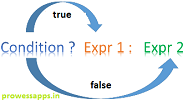
Conditional (ternary) operator is a shorthand if-else that evaluates a boolean expression and returns one of two values.
Code Example
public class Test {
  public static void main(String[] args) {
    int a = 10, b = 20;
    int max = (a > b) ? a : b;
    System.out.println("Max = " + max);
  }
}
Output: Max = 20
8. Shift Operator
Shift operators are used to move the bits of a number towards left or right. They are commonly used for fast multiplication/division by powers of 2.
- Left Shift ( << ): Shifts bits to the left, filling with 0s. Equivalent to multiplying by 2 for each shift.
- Right Shift ( >> ): Shifts bits to the right, preserving the sign bit (MSB).
- Unsigned Right Shift ( >>> ): Shifts bits to the right, filling with 0s (ignores sign bit).
Code Example
// 1. Left Shift ( << )
class Test {
  public static void main(String[] args) {
    int x = 6 << 2;
    System.out.println(x);
    // OUTPUT: 24
  }
}

// 2. Right Shift ( >> )
class Test {
  public static void main(String[] args) {
    int x = 6 >> 2;
    System.out.println(x);
    // OUTPUT: 1
  }
}

// 3. Unsigned Right Shift ( >>> )
class Test {
  public static void main(String[] args) {
    int x = 6 >>> 2;
    System.out.println(x);
    // OUTPUT: 1
  }
}
Explanation
6 << 2
6 = 0000 0110
1st shift -> 0000 1100
2nd shift -> 0001 1000 = 24

6 >> 2
6 = 0000 0110
1st shift -> 0000 0011
2nd shift -> 0000 0001 = 1
9. instanceof Operator
The instanceof operator is used only for object reference variables.
It checks whether an object is an instance of a particular class or implements an interface.
The result is always a boolean value (true or false).
Syntax
(ref.variable) instanceof (class/interface)
Code Example
class Test {
  public static void main(String[] args) {
    String name = "Ayan";

    // returns true since 'name' is of type String
    boolean res = name instanceof String;
    System.out.println(res);
  }
}
Output: true
Operator Precedence
When more than one operator is used in an expression, Java follows a predefined rule of priority that decides which operator is evaluated first. This rule is known as operator precedence.
Note: If two operators have the same precedence, the expression is evaluated based on their associativity.
Most operators are left-to-right, but assignment (=, +=, -=, etc.) is right-to-left.
Java Operator Precedence Table
| Precedence | Operator | Description | Associativity |
|---|---|---|---|
| 1 | () , [] , . | Parentheses, Array, Member Access | Left-to-Right |
| 2 | ++ , -- , + (unary), - (unary), ! , ~ | Unary operators | Right-to-Left |
| 3 | * , / , % | Multiplication, Division, Modulus | Left-to-Right |
| 4 | + , - | Addition, Subtraction | Left-to-Right |
| 5 | << , >> , >>> | Shift operators | Left-to-Right |
| 6 | < , <= , > , >= , instanceof | Relational operators | Left-to-Right |
| 7 | == , != | Equality operators | Left-to-Right |
| 8 | & | Bitwise AND | Left-to-Right |
| 9 | ^ | Bitwise XOR | Left-to-Right |
| 10 | | | Bitwise OR | Left-to-Right |
| 11 | && | Logical AND | Left-to-Right |
| 12 | || | Logical OR | Left-to-Right |
| 13 | ? : | Ternary Conditional | Right-to-Left |
| 14 | = , += , -= , *= , /= , %= , &= , ^= , |= , <<= , >>= , >>>= | Assignment operators | Right-to-Left |
Source: prowessapps.com
Common Mistakes
- Using = instead of == in conditions.
- Confusing ++i and i++.
- Ignoring operator precedence.
- Using & instead of &&.
- Using | instead of ||.
- Operators perform operations on variables, values, and expressions.
- Java supports arithmetic, assignment, relational, logical, bitwise, shift, ternary, and instanceof operators.
- Expressions combine operators and operands to produce a result.
- Operator precedence defines the execution order of operators in an expression.
Interview Questions ⭐
🧠 Test your understanding with a quick quiz
🚀 Quick Knowledge Check
Topic: Operators | Language: Java
Q1. Which operator is used for short-circuit AND?
Q2. What will be the output of this code?
int x = 5;
System.out.println(x++ + ++x);Q3. The associativity of the assignment operator (=) in Java is:
Q4. Which operator is known as the ternary operator in Java?
Q5. Which operator has the highest precedence in Java?
Q6. Which operator is used to check object type?
String name = "Ayan";
boolean res = name instanceof String;
System.out.println(res);Q7. What will be the output of this code?
System.out.println(10 % 3);Q8. What will be the output of this code?
int a = 5, b = 10;
System.out.println(a > b ? a : b);Q9. Which of the following is a bitwise AND operator in Java?
Q10. What is the result of 10 >> 2?
System.out.println(10 >> 2);🎉 Great progress! Continue learning Java step by step.
Have you completed this lesson?
Mark this lesson as completed to track your learning progress. To keep track across devices, please login and save your learning progress.

Discussion
Ask questions, share suggestions, or discuss this lesson.