Java Enhanced For Loop - For-Each Loop with Examples
⏱️ 7 min read • Beginner Level • Lesson 29
The enhanced for loop in Java, also called the for-each loop, is used to iterate through arrays and collections in a simple and readable way.
It is commonly used when you want to access every element of an array or collection without using an index. Before learning enhanced for loop, you should understand Java for loop, Java arrays, and Java collections.
What is Enhanced For Loop in Java?
The enhanced for loop is a simplified version of the normal for loop.
It is used to access each element of an array or collection one by one.
-
It is also known as the for-each loop.
-
It works on elements directly, not on index positions.
-
It makes code shorter, cleaner, and easier to read.
Syntax of Enhanced For Loop
The syntax of enhanced for loop is:
for (dataType variableName : arrayOrCollection) {
    // code to be executed
}Flowchart of enhanced for loop
The following diagram shows how an enhanced for loop works. Java initializes the loop variable, checks the condition, executes the loop body, updates the variable, and then repeats.
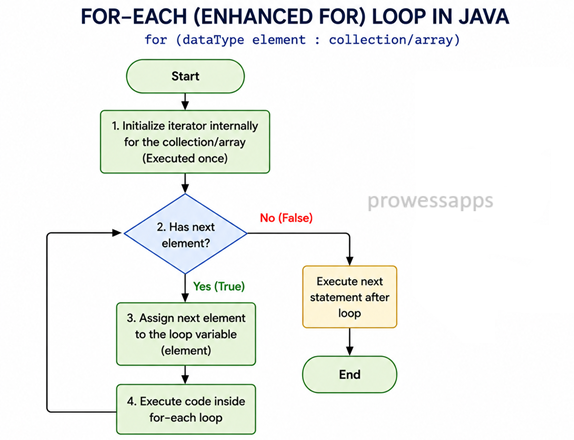
How does enhanced for loop work?
- Java starts from the first element of the array or collection.
- Each element is copied into the loop variable one by one.
- The loop body executes for each element.
- When all elements are processed, the loop stops automatically.
- No index variable is required.
Real-World Uses of Enhanced For Loop
- Displaying all student names from a classroom list.
- Printing product names from an online shopping catalog.
- Reading all values stored in an array.
- Processing records stored in an ArrayList.
- Generating reports from collections of data.
Enhanced For Loop with Array
The following example uses an enhanced for loop to print all elements of an integer array.
public class EnhancedForDemo {
    public static void main(String[] args) {
        int[] numbers = {1, 2, 3, 4, 5};

        for (int item : numbers) {
            System.out.println("Count is: " + item);
        }
    }
}
Output:
Count is: 1
Count is: 2
Count is: 3
Count is: 4
Count is: 5
Explanation
- An integer array named
numbersis created. - The enhanced for loop takes each element from the array one by one.
- The variable
itemstores the current element during each iteration. - The statement inside the loop prints the current value of
item. - The loop stops automatically after the last element.
Enhanced For Loop with String Array
Enhanced for loop can also be used with a String array.
public class StringArrayForEach {
    public static void main(String[] args) {
        String[] languages = {"Java", "Python", "C++", "JavaScript"};

        for (String language : languages) {
            System.out.println(language);
        }
    }
}
Output:
Java
Python
C++
JavaScript
Explanation
- A String array named
languagesis created. - The enhanced for loop visits each element one by one.
- The current element is stored in
language. - Each language name is printed.
- The loop automatically stops after the last element.
Enhanced For Loop with ArrayList
Enhanced for loop is very useful with collections such as ArrayList.
import java.util.ArrayList;

public class ArrayListForEachExample {
    public static void main(String[] args) {
        ArrayList<String> names = new ArrayList<>();

        names.add("Ayan");
        names.add("Sarah");
        names.add("John");

        for (String name : names) {
            System.out.println(name);
        }
    }
}
Output:
Ayan
Sarah
John
Limitations of Enhanced For Loop
Enhanced for loop is simple and readable, but it has some limitations.
- It does not provide direct access to the index.
- It is not ideal when you need to modify elements by index.
- It is not suitable when you need to iterate in reverse order.
- It should not be used when you need to skip elements based on index position.
int[] numbers = {10, 20, 30};

for(int item : numbers) {
    // Cannot directly access index here
    System.out.println(item);
}
Since enhanced for loop does not provide an index variable, use a normal
for loop when index access is required.
for loop when you need index control.
Use enhanced for loop when you only need to read elements one by one.
Difference Between for Loop and Enhanced For Loop
| Normal for Loop | Enhanced for Loop |
|---|---|
| Uses index or counter variable. | Works directly with elements. |
| Useful when index is required. | Useful when only element values are required. |
| Can iterate forward, backward, or skip elements. | Iterates from first element to last element automatically. |
| Better for modifying array elements by index. | Better for simple reading and printing elements. |
Common Mistakes in Enhanced For Loop
- Trying to access index directly inside enhanced for loop.
- Using enhanced for loop when index-based modification is needed.
- Thinking the loop variable changes the original primitive array value.
- Using the wrong data type for the loop variable.
- Trying to iterate backward using enhanced for loop.
What is the biggest advantage of the enhanced for loop over a normal for loop?
The enhanced for loop makes code shorter and easier to read because it works directly with elements and does not require an index variable.
- Enhanced for loop is also called for-each loop.
- It is used to iterate through arrays and collections.
- It works directly with elements rather than indexes.
- It makes code shorter and easier to read.
- Use normal for loop when index control is required.
Frequently Asked Questions
🧠 Test your understanding with a quick quiz
🚀 Quick Knowledge Check
Topic: Enhanced-for-loop | Language: Java
Q1. Enhanced for loop can be used with which of the following?
Q2. Which syntax is correct for enhanced for loop?
Q3. What will be the output?
String[] names = {"Ayan", "Sarah"};
for (String name : names) {
    System.out.println(name);
}Q4. What will be the output of this code?
int[] numbers = {1, 2, 3};
for (int n : numbers) {
    System.out.println(n);
}Q5. What is a limitation of enhanced for loop?
Q6. Does enhanced for loop give direct access to index?
Q7. What is another name for enhanced for loop in Java?
Q8. Which statement is true about enhanced for loop?
Q9. What is the main use of enhanced for loop?
Q10. Which loop should be used when index access is required?
🎉 Great job! Continue learning Java step by step.