Java Switch Case - Syntax, Examples, break and default
⏱️ 8 min read • Beginner Level • Lesson 25
Completed on . You can revise this lesson or continue to the next topic.
The switch case statement in Java is used when we want to choose
one block of code from multiple possible options. It is often cleaner than writing
many if-else-if conditions for fixed values.
Before learning switch, you should understand
Java if statement,
Java if-else statement, and
Java if-else-if ladder.
- What is switch case?
- Supported Data Types
- Syntax of switch case
- Flowchart of switch case
- How does it work?
- Menu Driven Example
- break Statement in switch
- default Case in switch
- Fall-through in switch
- Using break to Prevent Fall-through
- String in switch
- Nested switch
- switch vs if-else-if
- Common Mistakes
- Summary
What is Switch Case in Java?
A switch statement allows a program to compare one expression against
multiple constant values. When a matching case is found, Java executes
the statements written inside that case.
-
switchis useful when there are multiple fixed choices. -
Each choice is written using a
caselabel. -
The
defaultblock runs when no case matches.
Supported Data Types in switch
In Java, the switch expression supports several data types.
| Supported Type | Example |
|---|---|
byte, short, char, int |
switch(choice) |
String |
switch(month) |
enum |
switch(day) |
| Wrapper classes | Byte, Short, Character, Integer |
float,
double, boolean, or long as switch expressions.
Syntax of switch case in Java
The general syntax of a switch statement is:
switch (expression) {
    case value1:
        // statements
        break;

    case value2:
        // statements
        break;

    default:
        // statements if no case matches
}
Flowchart of switch case
The following diagram shows how a switch statement checks case values and executes the matching case.
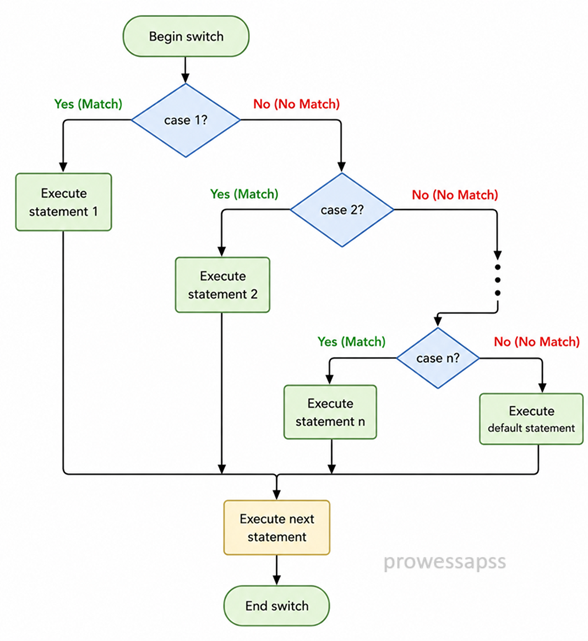
How does it work?
- Java evaluates the expression inside
switch. - The result is compared with each
casevalue. - If a matching case is found, that case block starts executing.
- The
breakstatement stops the switch block. - If no case matches, the
defaultblock executes, if present.
Real-World Uses of switch Case
- ATM menu selection.
- Restaurant ordering systems.
- Mobile application menus.
- Game difficulty selection.
- Command-based applications.
Java Switch Case Program Example
The following program shows a simple menu and performs an action based on the user's choice.
import java.util.Scanner;

public class SwitchMenuExample {
    public static void main(String[] args) {
        Scanner sc = new Scanner(System.in);

        System.out.println("MENU");
        System.out.println("----------");
        System.out.println("1. for Hello");
        System.out.println("2. for Bye");
        System.out.println("----------");

        System.out.print("Enter Your Choice: ");
        int choice = sc.nextInt();

        switch (choice) {
            case 1:
                System.out.println("HELLO USER!!");
                break;

            case 2:
                System.out.println("BYE USER!!");
                break;

            default:
                System.out.println("INVALID!!");
        }

        sc.close();
    }
}
Sample Input:
1
Output:
MENU
----------
1. for Hello
2. for Bye
----------
Enter Your Choice: HELLO USER!!
Explanation
- The program displays a menu to the user.
- The user enters a choice, and it is stored in
choice. - The
switchstatement compareschoicewith available cases. - If
choiceis1, it printsHELLO USER!!. - If
choiceis2, it printsBYE USER!!. - If no case matches, the
defaultblock printsINVALID!!.
break Statement in switch
The break statement stops the execution of a switch block.
Without break, Java continues executing the next cases. This is called
fall-through.
default Case in switch
The default block executes when none of the case values match the switch expression.
It is optional, but recommended when you want to handle invalid choices.
Fall-through in switch
Fall-through happens when a case does not contain break.
In that case, Java continues executing the next case statements even if they do not match.
public class FallThroughExample {
    public static void main(String[] args) {
        int choice = 1;

        switch (choice) {
            case 1:
                System.out.println("Case 1");

            case 2:
                System.out.println("Case 2");

            default:
                System.out.println("Default case");
        }
    }
}
Output:
Case 1
Case 2
Default case
break after each case if you do not want
fall-through behavior.
Fixed Example: Using break to Prevent Fall-through
To prevent fall-through, add a break statement at the end of each
case block. Once Java executes a matching case, the break
statement stops the switch block immediately.
public class SwitchWithBreakExample {
    public static void main(String[] args) {
        int choice = 1;

        switch (choice) {
            case 1:
                System.out.println("Case 1");
                break;

            case 2:
                System.out.println("Case 2");
                break;

            default:
                System.out.println("Default");
        }
    }
}
Output:
Case 1
Explanation
-
The value of
choiceis1. -
Java matches
case 1and printsCase 1. -
After printing, the
breakstatement executes. -
The
breakstatement immediately stops the switch block. -
Because of
break, Java does not executecase 2or thedefaultblock.
break prevents Java from executing the next cases.
This helps avoid accidental fall-through behavior in a switch statement.
Using String in switch
From Java SE 7, you can use a String value in a switch statement.
This is useful for comparing fixed text values such as month names, commands, or menu options.
public class StringSwitchDemo {
    public static void main(String[] args) {
        String month = "august";

        switch (month) {
            case "january":
                System.out.println("1st Month");
                break;

            case "february":
                System.out.println("2nd Month");
                break;

            case "march":
                System.out.println("3rd Month");
                break;

            case "april":
                System.out.println("4th Month");
                break;

            case "may":
                System.out.println("5th Month");
                break;

            case "june":
                System.out.println("6th Month");
                break;

            case "july":
                System.out.println("7th Month");
                break;

            case "august":
                System.out.println("8th Month");
                break;

            case "september":
                System.out.println("9th Month");
                break;

            case "october":
                System.out.println("10th Month");
                break;

            case "november":
                System.out.println("11th Month");
                break;

            case "december":
                System.out.println("12th Month");
                break;

            default:
                System.out.println("Wrong Month");
        }
    }
}
Output:
8th Month
Nested switch Statement in Java
A nested switch means writing one switch statement inside another switch statement. It is used when a decision has multiple levels.
public class NestedSwitchExample {
    public static void main(String[] args) {
        int category = 2;
        int item = 1;

        switch (category) {
            case 1:
                switch (item) {
                    case 1:
                        System.out.println("Category 1, Item 1");
                        break;
                    case 2:
                        System.out.println("Category 1, Item 2");
                        break;
                    default:
                        System.out.println("Invalid Item for Category 1");
                }
                break;

            case 2:
                switch (item) {
                    case 1:
                        System.out.println("Category 2, Item 1");
                        break;
                    case 2:
                        System.out.println("Category 2, Item 2");
                        break;
                    default:
                        System.out.println("Invalid Item for Category 2");
                }
                break;

            default:
                System.out.println("Invalid Category");
        }
    }
}
Output:
Category 2, Item 1
Difference Between switch and if-else-if
| switch Statement | if-else-if Ladder |
|---|---|
| Best for fixed values. | Best for ranges and complex conditions. |
| Compares one expression with multiple cases. | Can check different expressions and conditions. |
Uses case, break, and default. |
Uses if, else if, and else. |
Cannot directly check conditions like x > 10 in classic switch cases. |
Can check relational and logical conditions easily. |
Common Mistakes in switch case
- Forgetting
break, causing fall-through. - Using unsupported data types such as
doubleorboolean. - Writing duplicate case values.
- Expecting
defaultto be mandatory. It is optional but useful. - Using
switchfor range-based conditions whereif-else-ifis better.
- The
switchstatement is used to select one block from multiple choices. - Each option is written using a
caselabel. - The
breakstatement prevents fall-through. - The
defaultblock executes when no case matches. - Java supports
Stringin switch from Java SE 7. - Nested switch is possible but should be used carefully to keep code readable.
Interview Questions ⭐
🧠 Test your understanding with a quick quiz
🚀 Quick Knowledge Check
Topic: Switch-case | Language: Java
Q1. What happens if break is missing in a matched case?
Q2. From which Java version can String be used in switch?
Q3. Which block executes when no case value matches?
Q4. Is the default block mandatory in Java switch?
Q5. What is the purpose of break in switch case?
Q6. Which keyword is used to define a possible value in a switch statement?
Q7. Which of the following is NOT supported as a classic switch expression type in Java?
Q8. What is the main purpose of a switch statement in Java?
Q9. Which statement is true about nested switch?
Q10. What will be the output of this code?
int choice = 1;
switch (choice) {
    case 1:
        System.out.println("One");
    case 2:
        System.out.println("Two");
    default:
        System.out.println("Default");
}🎉 Great job! Continue learning Java step by step.
Have you completed this lesson?
Mark this lesson as completed to track your learning progress. To keep track across devices, please login and save your learning progress.

Discussion
Ask questions, share suggestions, or discuss this lesson.