Java If Statement - Syntax, Flowchart and Examples
⏱️ 7 min read • Beginner Level • Lesson 21
Completed on . You can revise this lesson or continue to the next topic.
The if statement in Java is used to execute a block of code
only when a specified condition is true. It is one of the most basic
and important decision-making statements in Java programming.
Before learning the if statement, you should understand
Java operators,
Java data types, and
Java variables.
Decision Making in Java
Many times, we want a set of instructions to execute only in a particular situation.
For example, if a student gets marks greater than or equal to 33, we may want to print
"Pass". Otherwise, we may print something else.
This kind of logic is handled using decision control statements.
In decision-making, Java checks a condition and executes code based on whether the
condition evaluates to true or false.
-
Decision-making statements help programs choose different paths.
-
Conditions usually use relational and logical operators such as
>,<,==,&&, and||. -
If the condition is
true, the statement block executes. If it isfalse, the block is skipped.
Real World Examples of if Statement
- Checking whether a student has passed an exam.
- Verifying login credentials.
- Checking account balance before withdrawal.
- Determining voting eligibility based on age.
- Applying discounts based on purchase amount.
Types of Conditional Statements in Java
Java supports multiple decision-making statements. Each one is used for a different type of condition-based logic.
| Statement | Use | Learn More |
|---|---|---|
| Simple if Statement | Executes code only when condition is true. | Current Topic |
| if-else Statement | Executes one block if true and another block if false. | Read |
| if-else-if Ladder | Checks multiple conditions one by one. | Read |
| Nested if Statement | Places one if statement inside another if statement. | Read |
| switch-case Statement | Selects one block from multiple options. | Read |
What is if Statement in Java?
The if statement checks a boolean condition. If the condition is
true, the code inside the if block is executed.
If the condition is false, the block is skipped.
- The condition inside
ifmust produce a boolean value. - The if block executes only when the condition is true.
- If the condition is false, Java skips the if block and continues after it.
Syntax of if Statement
if (condition) {
    // statements execute only if condition is true
}a < 20, marks >= 33, or isValid == true.
public class IfExample {
    public static void main(String[] args) {

        int marks = 70;

        if(marks >= 33) {
            System.out.println("Pass");
        }
    }
}
Output: Pass
The above code prints Pass if the marks are greater than or equal to 33.
Flowchart of if Statement
The following diagram shows how an if statement works.
Java first checks the condition. If it is true, the if block executes.
Otherwise, the block is skipped.
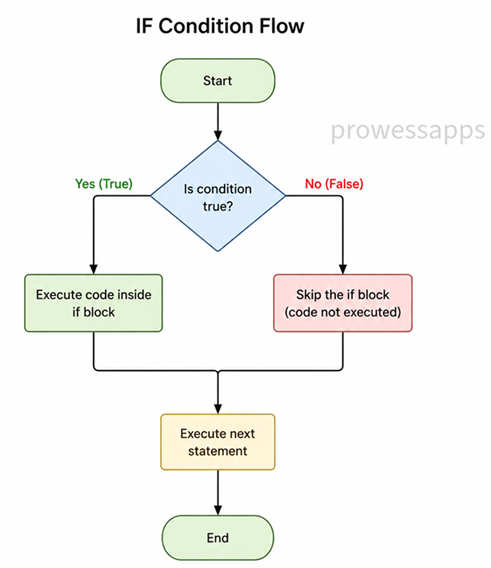
Execution flow of Java if statement
Java if Statement Example
The following program checks whether the value of a is less than 20.
Since the condition is true, the message inside the if block is printed.
public class IfStatementExample {
    public static void main(String[] args) {
        int a = 10;

        if (a < 20) {
            System.out.println("a is less than 20");
        }

        System.out.println("value of a is: " + a);
    }
}
Output:
a is less than 20
value of a is: 10
Explanation of the Program
- The class name is
IfStatementExample. - The
main()method is the entry point of the program. - The variable
ais initialized with value10. - The condition
a < 20is checked. - Since
10 < 20is true, the message inside the if block is printed. - The last statement prints the value of
a.
Another Example: Check Passing Marks
Here is another simple example that checks whether a student has passed based on marks.
public class PassCheckExample {
    public static void main(String[] args) {
        int marks = 75;

        if (marks >= 33) {
            System.out.println("You passed the exam.");
        }

        System.out.println("Program completed.");
    }
}
Output:
You passed the exam.
Program completed.
Common Mistakes with if Statement
-
Using assignment operator
=instead of comparison operator==. -
Forgetting braces
{ }when multiple statements should be inside the if block. - Writing a condition that does not return a boolean value.
-
Adding an unwanted semicolon after the
ifcondition.
Mistake: Semicolon after if condition
public class IfSemicolonMistake {
    public static void main(String[] args) {
        int marks = 20;

        if (marks >= 33); {
            System.out.println("This line runs because of the unwanted semicolon.");
        }
    }
}if condition. It ends the if statement early and can produce unexpected output.
- The
ifstatement is used for decision-making in Java. - The condition inside
ifmust evaluate totrueorfalse. - If the condition is true, the code inside the if block executes.
- If the condition is false, the if block is skipped.
- Use braces
{ }for better readability and safer code.
Interview Questions ⭐
🧠 Test your understanding with a quick quiz
🚀 Quick Knowledge Check
Topic: If-statement | Language: Java
Q1. What will be the output of the following code?
int number = 50;
if (number > 10);
{
    System.out.println("Inside block");
}Q2. What will be the output of this code?
int marks = 25;
if (marks >= 33) {
    System.out.println("Pass");
}
System.out.println("Result checked");Q3. Which of the following conditions checks whether age is greater than or equal to 18?
Q4. What will happen if the condition in an if statement is false?
Q5. What is the main purpose of an if statement in Java?
Q6. What will be the output of the following code?
int a = 10;
if (a < 20) {
    System.out.println("a is less than 20");
}
System.out.println("Done");Q7. What is wrong with the following code?
int x = 10;
if (x = 10) {
    System.out.println("Hello");
}Q8. Which operator is commonly used to compare two values inside an if statement?
Q9. Which of the following is the correct syntax of an if statement in Java?
Q10. What type of expression must be used inside an if condition in Java?
🎉 Great job! Continue learning Java step by step.
Have you completed this lesson?
Mark this lesson as completed to track your learning progress. To keep track across devices, please login and save your learning progress.

Discussion
Ask questions, share suggestions, or discuss this lesson.