Java Break Statement - Exit Loops and Switch with Examples
⏱️ 8 min read • Beginner Level • Lesson 30
Completed on . You can revise this lesson or continue to the next topic.
The break statement in Java is used to stop the current loop or switch statement immediately. It is like pressing an emergency stop button when your program has already found what it needs.
Before learning the break statement, you should understand Java for loop, Java while loop, Java do-while loop, and Java switch case.
What is break Statement in Java?
In Java, the break statement is used to terminate the nearest
loop or switch statement. Once Java executes break, control moves
to the statement immediately after that loop or switch block.
-
breakstops a loop before its normal ending condition. -
breakprevents fall-through inswitchstatements. -
breakis useful when searching, validating input, stopping menus, or exiting nested loops.
Syntax of break Statement
The syntax of break is very simple:
break;break statement can be used inside loops and switch statements.
It cannot be used directly outside a loop, switch, or labeled block.
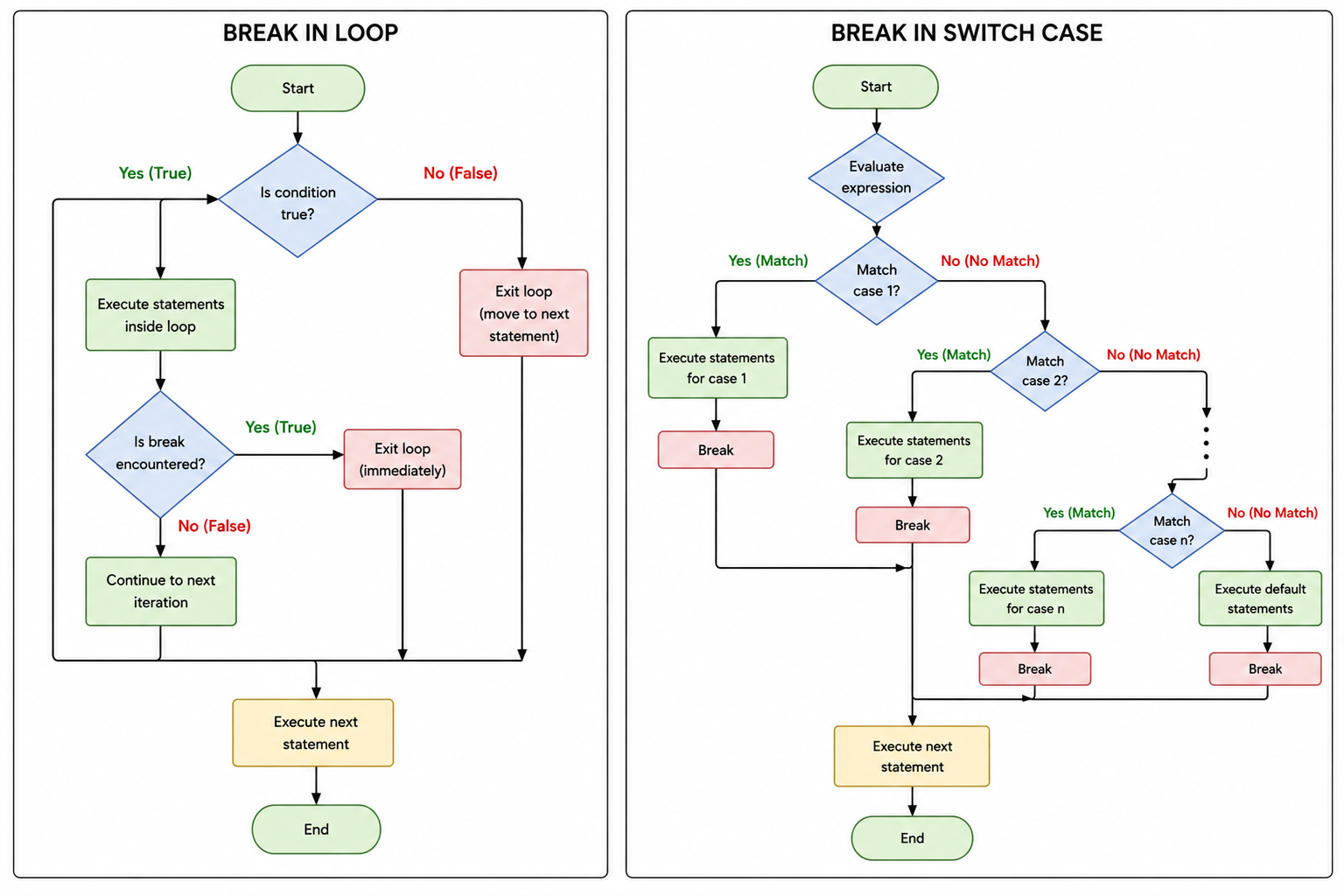
Flowchart of break Statement
The flowchart of break statement is shown below:
How does break work?
- Java executes statements normally.
- When Java reaches a
breakstatement, it immediately stops the nearest loop or switch. - The remaining statements inside that loop or switch are skipped.
- Program control continues from the next statement after the loop or switch.
Example: break in for Loop
In this example, the loop should normally print numbers from 1 to 10,
but we stop it when the value becomes 5.
public class BreakInForLoop {
    public static void main(String[] args) {
        for (int i = 1; i <= 10; i++) {
            if (i == 5) {
                break;
            }

            System.out.println(i);
        }

        System.out.println("Loop stopped.");
    }
}
Output:
1
2
3
4
Loop stopped.
Explanation
- The loop starts from
i = 1. - Java prints values
1,2,3, and4. - When
ibecomes5, the conditioni == 5becomes true. - The
breakstatement executes and stops the loop immediately. - The program continues after the loop and prints
Loop stopped.
Example: break in while Loop
This example stops a while loop when the counter reaches 4.
public class BreakInWhileLoop {
    public static void main(String[] args) {
        int count = 1;

        while (count <= 10) {
            if (count == 4) {
                break;
            }

            System.out.println("Count: " + count);
            count++;
        }

        System.out.println("Stopped at count 4.");
    }
}
Output:
Count: 1
Count: 2
Count: 3
Stopped at count 4.
Menu Exit Example using break
The break statement is commonly used in menu-driven programs.
In this example, the menu keeps running inside an infinite while(true) loop.
When the user enters 2, the break statement stops the loop and terminates the program.
import java.util.Scanner;

public class ExitMenu {
    public static void main(String[] args) {
        Scanner sc = new Scanner(System.in);

        while (true) {
            System.out.println("1. Continue");
            System.out.println("2. Exit");
            System.out.print("Enter your choice: ");

            int choice = sc.nextInt();

            if (choice == 2) {
                break;
            }

            System.out.println("Menu continues...");
        }

        System.out.println("Program terminated.");

        sc.close();
    }
}
Sample Input:
1
2
Output:
1. Continue
2. Exit
Enter your choice: 1
Menu continues...
1. Continue
2. Exit
Enter your choice: 2
Program terminated.
Explanation
-
The program imports the
Scannerclass from thejava.utilpackage. -
A
Scannerobject namedscis created to read input from the keyboard. -
The loop is written as
while(true), which creates an infinite loop. -
Inside the loop, the program displays two menu options:
1. Continueand2. Exit. -
The user enters a choice using
sc.nextInt(). -
If the user enters
1, the conditionchoice == 2is false, so the program printsMenu continues...and shows the menu again. -
If the user enters
2, the conditionchoice == 2becomes true. -
The
breakstatement executes and immediately stops thewhileloop. -
After the loop stops, the program continues with the next statement and prints
Program terminated.. -
Finally,
sc.close()closes the Scanner object.
while(true) creates an infinite loop. The break statement is used to safely exit the loop when a specific condition is met.
Example: break in switch Statement
In a switch statement, break is used to stop fall-through.
Without break, Java may continue executing the next cases.
public class BreakInSwitch {
    public static void main(String[] args) {
        int choice = 2;

        switch (choice) {
            case 1:
                System.out.println("Start Game");
                break;

            case 2:
                System.out.println("Open Settings");
                break;

            case 3:
                System.out.println("Exit Game");
                break;

            default:
                System.out.println("Invalid choice");
        }
    }
}
Output:
Open Settings
switch statement, break prevents Java from executing
the next case accidentally.
Real-World Example: Stop Searching After Item is Found
Imagine you are searching for a roll number in a list. Once the roll number is found,
there is no need to continue checking the remaining elements. This is a perfect use case
for break.
public class SearchRollNumber {
    public static void main(String[] args) {
        int[] rollNumbers = {101, 102, 103, 104, 105};
        int search = 103;
        boolean found = false;

        for (int roll : rollNumbers) {
            System.out.println("Checking roll number: " + roll);

            if (roll == search) {
                found = true;
                System.out.println("Roll number found: " + roll);
                break;
            }
        }

        if (!found) {
            System.out.println("Roll number not found.");
        }
    }
}
Output:
Checking roll number: 101
Checking roll number: 102
Checking roll number: 103
Roll number found: 103
Why is break useful here?
After finding roll number 103, the program stops the loop.
It does not waste time checking 104 and 105.
This makes the program more efficient.
Interesting Example: Password Attempts using break
In this example, the user gets limited password attempts. If the correct password is entered,
the loop stops immediately using break.
public class PasswordAttemptExample {
    public static void main(String[] args) {
        String[] attempts = {"java123", "hello", "admin@123"};
        String correctPassword = "admin@123";

        for (String password : attempts) {
            System.out.println("Trying password: " + password);

            if (password.equals(correctPassword)) {
                System.out.println("Access granted!");
                break;
            }
        }
    }
}
Output:
Trying password: java123
Trying password: hello
Trying password: admin@123
Access granted!
break in Nested Loops
In nested loops, a normal break stops only the nearest inner loop.
The outer loop continues running.
public class BreakNestedLoop {
    public static void main(String[] args) {
        for (int row = 1; row <= 3; row++) {
            for (int col = 1; col <= 3; col++) {
                if (col == 2) {
                    break;
                }

                System.out.println("row = " + row + ", col = " + col);
            }
        }
    }
}
Output:
row = 1, col = 1
row = 2, col = 1
row = 3, col = 1
col becomes 2, the inner loop stops.
Then the outer loop moves to the next row.
Labeled break in Java
A labeled break can stop an outer loop directly. It is useful when you want to exit multiple nested loops at once.
public class LabeledBreakExample {
    public static void main(String[] args) {
        outerLoop:
        for (int row = 1; row <= 3; row++) {
            for (int col = 1; col <= 3; col++) {
                if (row == 2 && col == 2) {
                    break outerLoop;
                }

                System.out.println("row = " + row + ", col = " + col);
            }
        }

        System.out.println("Exited from outer loop.");
    }
}
Output:
row = 1, col = 1
row = 1, col = 2
row = 1, col = 3
row = 2, col = 1
Exited from outer loop.
Difference Between break and continue
| break | continue |
|---|---|
| Stops the loop completely. | Skips only the current iteration. |
| Control moves outside the loop. | Control moves to the next iteration. |
| Used when no more loop execution is needed. | Used when only one iteration should be skipped. |
| Can be used in loops and switch. | Used only in loops. |
Common Mistakes with break Statement
- Using
breakoutside a loop, switch, or labeled block. - Forgetting
breakinside a switch case and causing fall-through. - Thinking
breakstops all nested loops automatically. - Using
breakwhencontinueis actually needed. - Using too many labeled breaks, making code harder to understand.
What is the difference between break and continue in Java?
break terminates the loop completely, while continue skips only the current iteration and moves to the next iteration.
- The
breakstatement stops the nearest loop or switch immediately. - It is commonly used in
for,while,do-while, andswitch. - In nested loops, normal
breakexits only the inner loop. - Labeled
breakcan exit an outer loop directly. - Use
breakwhen you no longer need to continue the loop.
Interview Questions ⭐
🧠 Test your understanding with a quick quiz
🚀 Quick Knowledge Check
Topic: Break | Language: Java
Q1. What is the use of break in a switch statement?
Q2. What will be the output of this code?
int choice = 1;
switch (choice) {
    case 1:
        System.out.println("Case 1");
    case 2:
        System.out.println("Case 2");
    default:
        System.out.println("Default");
}Q3. What will be the output after adding break in each switch case?
int choice = 1;
switch (choice) {
    case 1:
        System.out.println("Case 1");
        break;
    case 2:
        System.out.println("Case 2");
        break;
    default:
        System.out.println("Default");
}Q4. What will be the output of this code?
for (int i = 1; i <= 3; i++) {
    for (int j = 1; j <= 3; j++) {
        if (j == 2) {
            break;
        }
        System.out.println("i=" + i + ", j=" + j);
    }
}Q5. What is the main purpose of the break statement in Java?
Q6. What will be the output of this code?
for (int i = 1; i <= 5; i++) {
    if (i == 3) {
        break;
    }
    System.out.println(i);
}Q7. What is a labeled break in Java used for?
Q8. In nested loops, what does a normal break statement stop?
Q9. Where can a normal break statement be used in Java?
Q10. What is the difference between break and continue?
🎉 Great job! Continue learning Java step by step.
Have you completed this lesson?
Mark this lesson as completed to track your learning progress. To keep track across devices, please login and save your learning progress.

Discussion
Ask questions, share suggestions, or discuss this lesson.