Java Continue Statement - Skip Current Iteration
⏱️ 6 min read • Beginner Level • Lesson 31
Completed on . You can revise this lesson or continue to the next topic.
The continue statement in Java is used to skip the current iteration of a loop and move directly to the next iteration.
Before learning continue, you should understand
Java for loop,
Java while loop,
Java do-while loop, and
Java break statement.
What is continue Statement in Java?
In Java, the continue statement skips the remaining code of the current
loop iteration and moves control to the next iteration.
-
continuedoes not stop the entire loop. -
It skips only the current iteration.
-
It is useful when you want to ignore some values and continue processing others.
Syntax of continue Statement
continue;How does continue work?
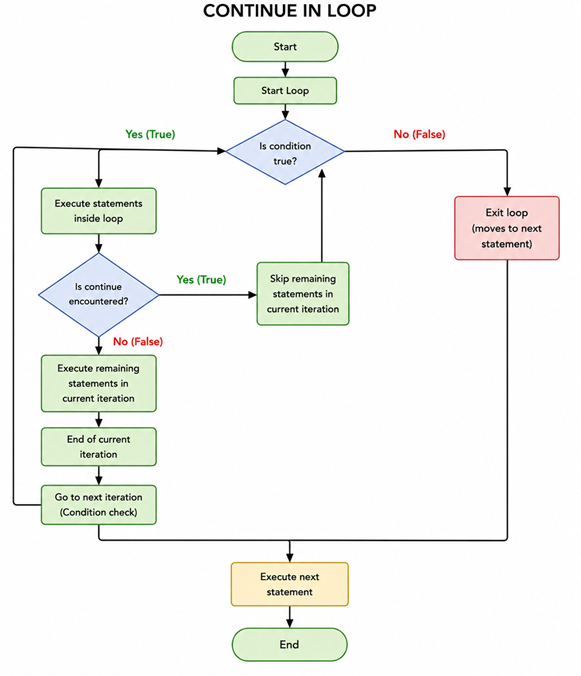
- Java enters the loop normally.
- When Java reaches
continue, it skips the remaining statements of that iteration. - The loop does not stop completely.
- Java moves to the next iteration of the loop.
Flowchart of continue Statement
The following flowchart shows how the continue statement skips the current iteration and moves directly to the next iteration of the loop.
Real-World Uses of continue Statement
- Skipping invalid records while processing data.
- Ignoring blocked users in a user list.
- Filtering unwanted values from arrays.
- Skipping failed transactions and continuing processing.
- Ignoring empty form fields during validation.
Example: continue in for Loop
This example skips printing number 3.
public class ContinueInForLoop {
    public static void main(String[] args) {
        for (int i = 1; i <= 5; i++) {
            if (i == 3) {
                continue;
            }

            System.out.println(i);
        }
    }
}
Output:
1
2
4
5
Explanation
- The loop starts from
1and runs up to5. - When
ibecomes3, the conditioni == 3becomes true. - The
continuestatement executes. - Java skips
System.out.println(i)for that iteration. - So
3is not printed.
Example: continue in while Loop
In a while loop, update the counter before continue.
Otherwise, the loop may become infinite.
public class ContinueInWhileLoop {
    public static void main(String[] args) {
        int i = 0;

        while (i < 5) {
            i++;

            if (i == 3) {
                continue;
            }

            System.out.println(i);
        }
    }
}
Output:
1
2
4
5
Explanation
- The variable
istarts at 0. - The loop increments
ibefore checking the condition. - When
ibecomes 3, thecontinuestatement executes. - The print statement is skipped for that iteration.
- Therefore, 3 is not displayed in the output.
Real Example: Skip Even Numbers
This program prints only odd numbers by skipping even numbers.
public class SkipEvenNumbers {
    public static void main(String[] args) {
        for (int i = 1; i <= 10; i++) {
            if (i % 2 == 0) {
                continue;
            }

            System.out.println(i);
        }
    }
}
Output:
1
3
5
7
9
Explanation
- The loop runs from
1to10. - The condition
i % 2 == 0checks whether the number is even. - If the number is even,
continueskips that iteration. - Only odd numbers reach the print statement.
Real Example: Skip Blocked Users
This example skips blocked users and processes only active users.
public class SkipBlockedUsers {
    public static void main(String[] args) {
        String[] users = {"Ayan", "Blocked", "Sarah", "John"};

        for (String user : users) {
            if (user.equals("Blocked")) {
                continue;
            }

            System.out.println("Processing user: " + user);
        }
    }
}
Output:
Processing user: Ayan
Processing user: Sarah
Processing user: John
continue in Nested Loops
In nested loops, a normal continue skips only the current iteration
of the nearest inner loop.
public class ContinueNestedLoop {
    public static void main(String[] args) {
        for (int row = 1; row <= 2; row++) {
            for (int col = 1; col <= 3; col++) {
                if (col == 2) {
                    continue;
                }

                System.out.println("row = " + row + ", col = " + col);
            }
        }
    }
}
Output:
row = 1, col = 1
row = 1, col = 3
row = 2, col = 1
row = 2, col = 3
Difference Between break and continue
| break | continue |
|---|---|
| Stops the loop completely. | Skips only the current iteration. |
| Control moves outside the loop. | Control moves to the next iteration. |
| Can be used in loops and switch. | Used only in loops. |
Common Mistakes with continue
- Using
continueoutside a loop. - Using
continueinsideswitchwithout a loop. - Forgetting to update the counter before
continuein awhileloop. - Using
continuewhenbreakis actually needed.
What is the difference between break and continue in Java?
break terminates the loop completely, while continue skips only the current iteration and continues with the next iteration.
- The
continuestatement skips the current loop iteration. - It does not stop the entire loop.
- It is useful for skipping unwanted values.
- In nested loops, normal
continueaffects the nearest loop. - Use
continuewhen you want to skip and move to the next iteration.
Interview Questions ⭐
🧠 Test your understanding with a quick quiz
🚀 Quick Knowledge Check
Topic: Continue | Language: Java
Q1. Does continue stop the loop completely?
Q2. What will be the output?
for (int i = 1; i <= 6; i++) {
    if (i % 2 == 0) {
        continue;
    }
    System.out.println(i);
}Q3. What will be the output of this code?
for (int i = 1; i <= 5; i++) {
    if (i == 3) {
        continue;
    }
    System.out.println(i);
}Q4. Which statement is true about continue?
Q5. What is the main purpose of the continue statement in Java?
🎉 Great job! Continue learning Java step by step.
Have you completed this lesson?
Mark this lesson as completed to track your learning progress. To keep track across devices, please login and save your learning progress.

Discussion
Ask questions, share suggestions, or discuss this lesson.