Java If-Else-If Ladder - Syntax, Flowchart and Examples
⏱️ 8 min read • Beginner Level • Lesson 23
Completed on . You can revise this lesson or continue to the next topic.
The if-else-if ladder in Java is used when we need to check
multiple related conditions one by one. Java checks each condition from top to bottom
and executes the block of the first condition that becomes true.
Before learning the if-else-if ladder, you should understand
Java if statement,
Java if-else statement, and
Java operators.
What is if-else-if Ladder in Java?
An if-else-if ladder is a chain of conditions. It is useful when
there are more than two possible decisions and only one block should be executed.
-
Java evaluates conditions from top to bottom.
-
The first condition that becomes
trueexecutes its block. -
If all conditions are
false, the optionalelseblock executes.
Syntax of if-else-if Ladder
The syntax contains one if block, one or more else if
blocks, and an optional else block.
if (condition1) {
    // executes if condition1 is true
} else if (condition2) {
    // executes if condition1 is false and condition2 is true
} else if (condition3) {
    // executes if previous conditions are false and condition3 is true
} else {
    // executes if none of the above conditions are true
}if-else-if ladder.
Once a true condition is found, Java skips the remaining conditions.
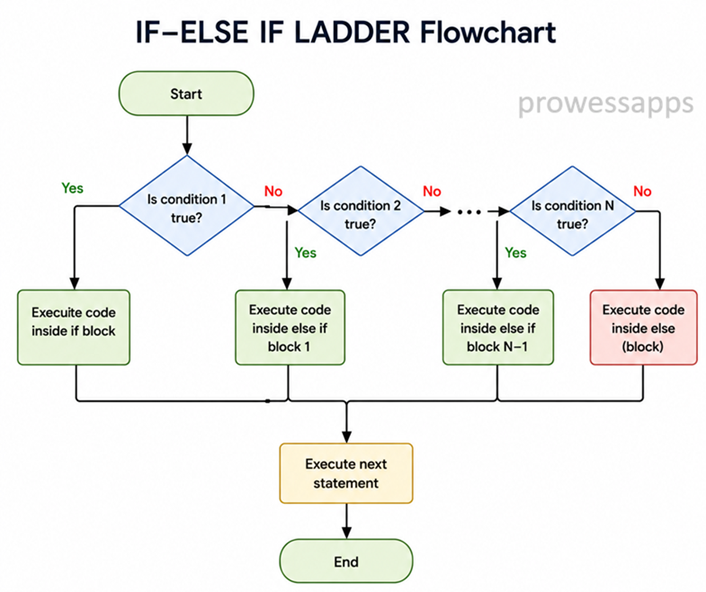
Flowchart of if-else-if Ladder
The following diagram shows how Java checks conditions in an if-else-if ladder.
How does it work?
- Java first checks the condition inside the
ifstatement. - If the first condition is
true, its block executes and the ladder ends. - If the first condition is
false, Java checks the nextelse ifcondition. - This continues until a true condition is found.
- If no condition is true, the
elseblock executes, if it is present. - Only one block executes in the entire ladder.
Real-World Uses of if-else-if Ladder
- Assigning grades based on marks.
- Calculating income tax slabs.
- Determining discount percentages.
- Selecting membership levels.
- Checking age categories such as child, adult, and senior citizen.
Java if-else-if Ladder Example
The following program compares the value of x with 10.
It checks whether x is greater than, less than, or equal to 10.
public class IfElseIfExample {
    public static void main(String[] args) {
        int x = 10;

        if (x > 10) {
            System.out.println("x is greater than 10");
        } else if (x < 10) {
            System.out.println("x is less than 10");
        } else {
            System.out.println("x is equal to 10");
        }
    }
}
Output:
x is equal to 10
Explanation
- The variable
xis initialized with the value10. - The first condition
x > 10is checked. It isfalse. - The second condition
x < 10is checked. It is alsofalse. - Since none of the above conditions are true, the
elseblock executes. - The program prints
x is equal to 10.
Example: Student Grade Program
This program uses an if-else-if ladder to print a student's grade
based on marks.
import java.util.Scanner;

public class GradeExample {
    public static void main(String[] args) {
        Scanner sc = new Scanner(System.in);

        System.out.print("Enter marks: ");
        int marks = sc.nextInt();

        if (marks < 0 || marks > 100) {
            System.out.println("Invalid marks! Please enter marks between 0 and 100.");
        } else if (marks >= 90) {
            System.out.println("Grade A");
        } else if (marks >= 80) {
            System.out.println("Grade B");
        } else if (marks >= 70) {
            System.out.println("Grade C");
        } else if (marks >= 60) {
            System.out.println("Grade D");
        } else {
            System.out.println("Grade F");
        }

        sc.close();
    }
}
Output1:
Enter marks: 75
Grade C
Output2:
Enter marks: 95
Grade A
Output3:
Enter marks: 120
Invalid marks! Please enter marks between 0 and 100.
Explanation of Grade Program
- The program imports the
Scannerclass to take input from the user. - A
Scannerobject namedscis created. - The user enters marks, and the value is stored in the variable
marks. - The first condition checks whether marks are invalid, meaning less than
0or greater than100. - If marks are valid, Java checks grade conditions from top to bottom.
- If
marks >= 90, the program printsGrade A. - If the first condition is false, Java checks
marks >= 80, thenmarks >= 70, and so on. - Only the first true condition executes in an
if-else-ifladder. - The
Scannerobject is closed usingsc.close().
Another Example: Day Type Program
The following example checks whether a day number represents a weekday, weekend, or invalid day.
public class DayTypeExample {
    public static void main(String[] args) {
        int day = 6;

        if (day >= 1 && day <= 5) {
            System.out.println("Weekday");
        } else if (day == 6 || day == 7) {
            System.out.println("Weekend");
        } else {
            System.out.println("Invalid day");
        }
    }
}
Output:
Weekend
Difference Between if-else and if-else-if Ladder
| if-else Statement | if-else-if Ladder |
|---|---|
| Used for two possible outcomes. | Used for multiple possible outcomes. |
Contains one if and one else. |
Contains one if, multiple else if, and optional else. |
| Good for simple true/false decisions. | Good for checking many related conditions. |
Common Mistakes in if-else-if Ladder
- Writing conditions in the wrong order.
- Using
=instead of==for comparison. - Forgetting that only the first true block executes.
- Adding unnecessary or unreachable conditions.
- Placing a semicolon after
iforelse ifcondition.
Mistake: Wrong Condition Order
In an if-else-if ladder, order matters. General conditions should not be placed before specific conditions.
public class WrongOrderExample {
    public static void main(String[] args) {
        int marks = 95;

        if (marks >= 60) {
            System.out.println("Passed");
        } else if (marks >= 90) {
            System.out.println("Excellent");
        }
    }
}marks >= 90
will never be checked because marks >= 60 becomes true first.
Always place more specific conditions before general conditions.
- The
if-else-ifladder is used to check multiple conditions. - Conditions are checked from top to bottom.
- Only the first true block is executed.
- The final
elseblock is optional. - Condition order is important in an if-else-if ladder.
Interview Questions ⭐
🧠 Test your understanding with a quick quiz
🚀 Quick Knowledge Check
Topic: If-else-if | Language: Java
Q1. Which of the following is the correct syntax for else-if in Java?
Q2. What will be the output of this code?
int marks = 95;
if (marks >= 60) {
    System.out.println("Passed");
} else if (marks >= 90) {
    System.out.println("Excellent");
}Q3. What will be the output of this code?
int marks = 75;
if (marks >= 90) {
    System.out.println("Grade A");
} else if (marks >= 80) {
    System.out.println("Grade B");
} else if (marks >= 70) {
    System.out.println("Grade C");
} else {
    System.out.println("Grade F");
}Q4. What will be the output of this code?
int x = 10;
if (x > 10) {
    System.out.println("Greater");
} else if (x < 10) {
    System.out.println("Less");
} else {
    System.out.println("Equal");
}Q5. Is the final else block mandatory in an if-else-if ladder?
Q6. What happens if all if and else-if conditions are false and there is no else block?
Q7. Which statement is true about if-else-if ladder?
Q8. What is the main purpose of an if-else-if ladder in Java?
Q9. Why should specific conditions usually be written before general conditions?
Q10. How many blocks can execute in a normal if-else-if ladder?
🎉 Great job! Continue learning Java step by step.
Have you completed this lesson?
Mark this lesson as completed to track your learning progress. To keep track across devices, please login and save your learning progress.

Discussion
Ask questions, share suggestions, or discuss this lesson.