JDK, JRE and JVM in Java - Difference Explained
⏱️ 8 min read • Beginner Level • Lesson 4
Completed on . You can revise this lesson or continue to the next topic.
In Java, three important terms are JDK, JRE, and JVM. These three components are closely related, but they have different roles. Understanding them helps you clearly understand how Java programs are developed, compiled, and executed.
After this lesson, you will know how to compile and run a Java program, and how to do Java environment setup.
Overview of JDK, JRE and JVM
Java has a layered execution model. When you write a Java program, you use the JDK. When the program runs, it needs the JRE. Inside the JRE, the JVM executes the compiled bytecode.
- JDK = Develop Java programs
- JRE = Run Java programs
- JVM = Execute Java bytecode
There are two principal products in the Java SE platform family:
- Java SE Runtime Environment (JRE)
- Java Development Kit (JDK)
Java Development Kit (JDK)
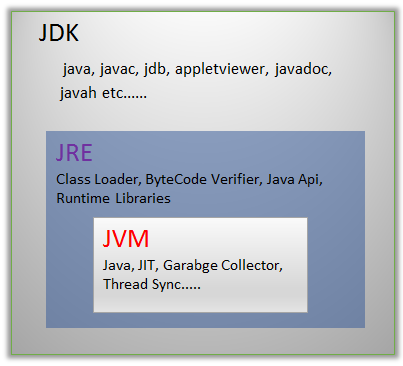
JDK stands for Java Development Kit. It provides the environment and tools required to develop, compile, and run Java programs.
JDK contains:
- Development tools like
javac, debugger, andjar - JRE for running Java applications
- Libraries and supporting files required for development
You need the JDK if you want to write and compile your own Java programs.
Java Runtime Environment (JRE)
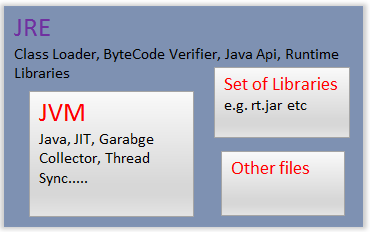
JRE stands for Java Runtime Environment. It provides the libraries, JVM, and other required components to run Java applications.
JRE is useful when you only want to run Java applications and do not need to compile or develop Java source code.
JRE contains:
- JVM
- Core Java libraries
- Runtime files required to execute Java applications
Java Virtual Machine (JVM)
JVM stands for Java Virtual Machine. It is an abstract machine that provides a runtime environment to execute Java bytecode.
Java source code is first compiled into bytecode. The JVM reads this bytecode and executes it on the underlying operating system.
- JVM executes Java bytecode.
- JVM is platform-dependent.
- Bytecode is platform-independent.
- Different operating systems have different JVM implementations.
Difference Between JDK, JRE and JVM
| Feature | JDK | JRE | JVM |
|---|---|---|---|
| Full Form | Java Development Kit | Java Runtime Environment | Java Virtual Machine |
| Purpose | Develop + Compile + Run Java programs | Run Java programs | Execute Java bytecode |
| Used By | Developers | Users / Applications | JRE internally |
| Contains | JRE + Development tools | JVM + Libraries | Execution engine only |
| Includes | JRE | JVM | Does not include others |
| Example Tools | javac, jar, debugger | java command | Interpreter, JIT Compiler |
JVM Architecture and Working
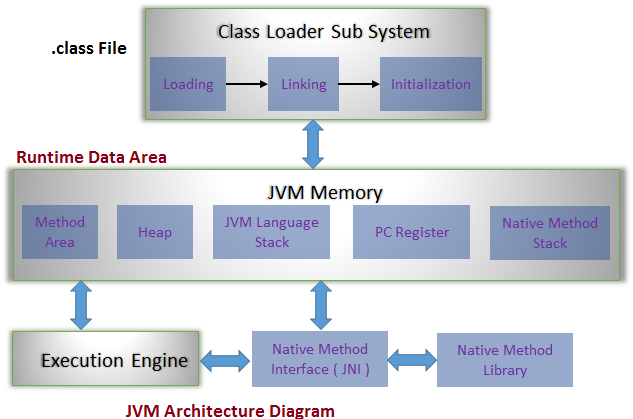
The JVM architecture is divided into important components that work together to load, verify, and execute Java bytecode.
1. Class Loader Subsystem
The Class Loader loads class files into memory and performs loading, linking, and initialization.
- Loading: Finds and imports class data.
- Linking: Performs verification, preparation, and resolution.
- Initialization: Assigns proper initial values to class variables.
2. Runtime Data Area
The Runtime Data Area stores data required during program execution.
- Method Area: Stores class-level data.
- Heap Area: Stores objects and instance variables.
- Stack Area: Stores method calls and local variables.
- PC Register: Stores the address of the current instruction.
- Native Method Stack: Supports native methods.
3. Execution Engine
The Execution Engine executes Java bytecode. It includes the interpreter and JIT compiler.
- Interpreter: Reads and executes bytecode line by line.
- JIT Compiler: Converts frequently used bytecode into native machine code for better performance.
- Garbage Collector: Removes unused objects from memory.
How JIT Compiler Improves Performance
The Just-In-Time (JIT) Compiler is a part of the JVM execution engine. It helps improve the performance of Java programs by converting bytecode into native machine code at runtime.
How JIT Works:
- Normally, JVM uses an interpreter to execute bytecode line by line.
- This can be slow for frequently used code.
- The JIT compiler identifies frequently executed code (hot spots).
- It converts this code into native machine code.
- Next time, the native code runs directly (much faster).
Without JIT:
Bytecode → Interpreted every time → Slower

With JIT:
Bytecode → Compiled to native code → Cached → Faster execution- JDK is used to develop and compile Java programs.
- JRE is used to run Java applications.
- JVM executes Java bytecode.
- JDK contains JRE, and JRE contains JVM.
- Java bytecode is platform independent, but JVM is platform dependent.
Interview Questions ⭐
🧠 Test your understanding with a quick quiz
🚀 Quick Knowledge Check
Topic: Jdk_jre_jvm | Language: Java
Q1. Which of the following is NOT a subsystem of the JVM?
Q2. In the Execution Engine, which component improves performance by converting frequently used bytecode into native code?
Q3. Looking at the Execution Engine in the diagram, which component executes bytecode one instruction at a time?
Q4. Which of the following correctly shows the sequence of operations in the Class Loader subsystem?
Q5. In the Class Loader subsystem, which step ensures correctness of the imported type?
Q6. In the JVM architecture diagram, which subsystem is responsible for loading, verifying, and preparing class files?
Q7. In the JVM diagram, which area is shared across the JVM and holds objects and arrays?
Q8. In the JVM architecture diagram, which stack contains native method information?
Q9. According to the diagram, which part of the Runtime Data Area is unique for each thread?
Q10. The JVM is considered as:
Q11. In the Runtime Data Area section of the diagram, which memory area stores static variables and class-level data?
Q12. Which part of the Runtime Data Area is unique to each thread?
Q13. Which component is required if you only want to run Java programs, not develop them?
Q14. Which runtime data area stores objects, instance variables, and arrays?
Q15. Which of the following is included in the JDK but not in the JRE?
Q16. Which component of the JVM improves performance by compiling frequently used bytecode into native code?
🎉 Great job! Continue learning Java step by step.
Have you completed this lesson?
Mark this lesson as completed to track your learning progress. To keep track across devices, please login and save your learning progress.

Discussion
Ask questions, share suggestions, or discuss this lesson.