Java Do-While Loop - Syntax, Flowchart and Examples
⏱️ 7 min read • Beginner Level • Lesson 27
Completed on . You can revise this lesson or continue to the next topic.
The do-while loop in Java is used to execute a block of code repeatedly
as long as a given condition is true. Unlike the while loop,
the do-while loop checks the condition after executing the loop body.
This means a do-while loop executes the loop body
at least once, even if the condition is false at the beginning.
Before learning this topic, you should understand
Java while loop,
Java operators, and
Java variables.
What is Do-While Loop in Java?
A do-while loop is an exit-controlled loop. It first executes the loop body
and then checks the condition. If the condition is true, the loop repeats.
If the condition is false, the loop stops.
-
The loop body executes before the condition is checked.
-
The
do-whileloop always runs at least once. -
It is useful when you want to execute code first and validate the condition later.
Use a do-while loop when a block of code must execute at least once before checking the condition.
Syntax of do-while Loop
The syntax of a do-while loop is slightly different from a
while loop because the condition appears at the end.
initialization;

do {
    // loop body
    update;
} while (condition);do-while loop must end with a semicolon
after the condition: while (condition);
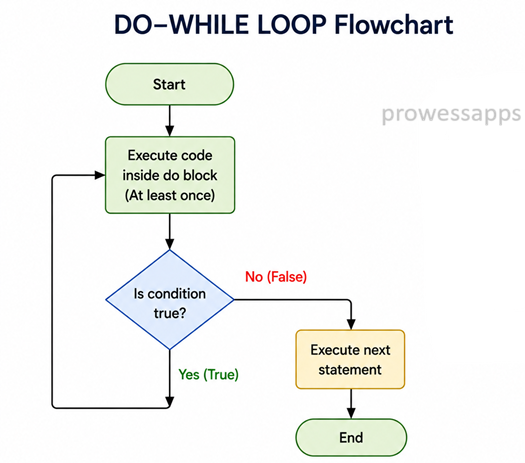
Flowchart of do-while Loop
The following diagram shows how a do-while loop works.
Java executes the loop body first and then checks the condition.
How does it work?
- Java first executes the statements inside the
doblock. - After executing the loop body, Java checks the condition inside
while. - If the condition is
true, the loop runs again. - If the condition is
false, the loop stops. - Because the condition is checked at the end, the loop body executes at least once.
Real-World Uses of do-while Loop
- ATM menu systems.
- Game menus.
- Input validation programs.
- Login retry systems.
- Programs that must execute at least once.
Java do-while Loop Example
The following program prints Hello five times using a
do-while loop.
public class DoWhileDemo {
    public static void main(String[] args) {
        int i = 1;

        do {
            System.out.println(i + ". Hello");
            i++;
        } while (i <= 5);
    }
}
Output:
1. Hello
2. Hello
3. Hello
4. Hello
5. Hello
Explanation
- The variable
iis initialized with value1. - The statements inside the
doblock execute first. - The program prints the value of
iwithHello. - The statement
i++increases the value ofiby1. - After each execution, the condition
i <= 5is checked. - When
ibecomes6, the condition becomes false and the loop stops.
Why do-while Loop Executes At Least Once?
In a do-while loop, the condition is checked after the loop body.
Therefore, even if the condition is false from the beginning, the loop body still runs once.
public class DoWhileRunsOnce {
    public static void main(String[] args) {
        int i = 10;

        do {
            System.out.println("This runs once");
        } while (i < 5);
    }
}
Output:
This runs once
while loop may execute zero times,
but a do-while loop always executes at least once.
Example: Sum of First 5 Numbers
This example calculates the sum of numbers from 1 to 5
using a do-while loop.
public class SumDoWhileLoop {
    public static void main(String[] args) {
        int i = 1;
        int sum = 0;

        do {
            sum = sum + i;
            i++;
        } while (i <= 5);

        System.out.println("Sum = " + sum);
    }
}
Output:
Sum = 15
Example: Menu using do-while Loop
The do-while loop is commonly used in menu-driven programs because
the menu should be displayed at least once.
import java.util.Scanner;

public class MenuDoWhileExample {
    public static void main(String[] args) {
        Scanner sc = new Scanner(System.in);
        int choice;

        do {
            System.out.println("MENU");
            System.out.println("1. Say Hello");
            System.out.println("2. Exit");
            System.out.print("Enter your choice: ");

            choice = sc.nextInt();

            if (choice == 1) {
                System.out.println("Hello User!");
            } else if (choice == 2) {
                System.out.println("Goodbye!");
            } else {
                System.out.println("Invalid choice!");
            }

        } while (choice != 2);

        sc.close();
    }
}
Sample Output:
MENU
1. Say Hello
2. Exit
Enter your choice: 1
Hello User!
MENU
1. Say Hello
2. Exit
Enter your choice: 2
Goodbye!
Difference Between while Loop and do-while Loop
| while Loop | do-while Loop |
|---|---|
| Condition is checked before loop body. | Condition is checked after loop body. |
| It may execute zero times. | It executes at least once. |
| It is entry-controlled. | It is exit-controlled. |
| Useful when condition should be checked first. | Useful when code must run at least once. |
Common Mistakes in do-while Loop
- Forgetting the semicolon after
while(condition);. - Forgetting to update the loop variable.
- Writing a condition that never becomes false.
- Confusing
whileloop withdo-whileloop. - Using
do-whilewhen the loop should not execute even once if the condition is false.
- The
do-whileloop executes a block of code repeatedly. - It checks the condition after executing the loop body.
- It is an exit-controlled loop.
- The loop body always executes at least once.
- The
do-whileloop is useful for menus and input validation.
Interview Questions ⭐
🧠 Test your understanding with a quick quiz
🚀 Quick Knowledge Check
Topic: Do-while-loop | Language: Java
Q1. Which symbol is required after the while condition in a do-while loop?
Q2. Which loop is best when the loop body must run at least once?
Q3. What will be the output of this code?
int i = 10;
do {
    System.out.println("Hello");
} while (i < 5);Q4. What is the main feature of a do-while loop in Java?
Q5. What is a common use case of do-while loop?
Q6. What causes an infinite do-while loop?
Q7. Which of the following is correct do-while syntax?
Q8. What will be the output of this code?
int i = 1;
do {
    System.out.println(i);
    i++;
} while (i <= 3);Q9. When is the condition checked in a do-while loop?
Q10. Which statement is true about do-while loop?
🎉 Great job! Continue learning Java step by step.
Have you completed this lesson?
Mark this lesson as completed to track your learning progress. To keep track across devices, please login and save your learning progress.

Discussion
Ask questions, share suggestions, or discuss this lesson.