Java Arrays - Declaration, Initialization, Types and Examples
⏱️ 12 min read • Beginner Level • Lesson 37
An array in Java is an object that stores multiple values of the same data type in a single variable. Arrays are useful when you need to store and process a group of related values.
Before learning arrays, you should understand Java Variables, Java Data Types, and Java Loops. After this lesson, continue with Java Strings.
- What is an array?
- Important points about arrays
- Array declaration
- Array construction
- Array initialization
- Default values in arrays
- length property
- Single dimensional array
- Different ways to create arrays
- for-each loop with array
- Passing array to method
- Multidimensional array
- Jagged array
- Array of objects
- Common mistakes
- Summary
What is an Array in Java?
An array is a collection of similar data items stored under one variable name. Each value in an array is called an element, and each element is accessed using an index.
int[] marks = {80, 75, 90};
In this example, marks is an integer array that stores three integer values.
Real-World Example of Arrays
Arrays are commonly used when we need to store multiple similar values.
- Marks of students in a class
- Monthly sales figures
- Temperatures recorded during a week
- Employee IDs in a department
- Product prices in an online store
For example, instead of creating separate variables:
int mark1 = 80;
int mark2 = 75;
int mark3 = 90;
We can store all values in a single array:
int[] marks = {80, 75, 90};
Important Points about Arrays in Java
- An array stores multiple values of the same type.
- Arrays are objects in Java.
- Arrays can hold primitive values or object references.
- The array itself is always created as an object on the heap.
- Array index starts from
0. - Array size is fixed after creation.
- Every array has a
lengthproperty.
Array Declaration in Java
Array declaration means creating a reference variable that can point to an array object. You can place square brackets on the left or right side of the variable name, but the left-side style is recommended.
int[] numbers;      // recommended
int numbers2[]; // works, but not recommendedint[] numbers; because it clearly shows that the type is an array of integers.
Array Construction in Java
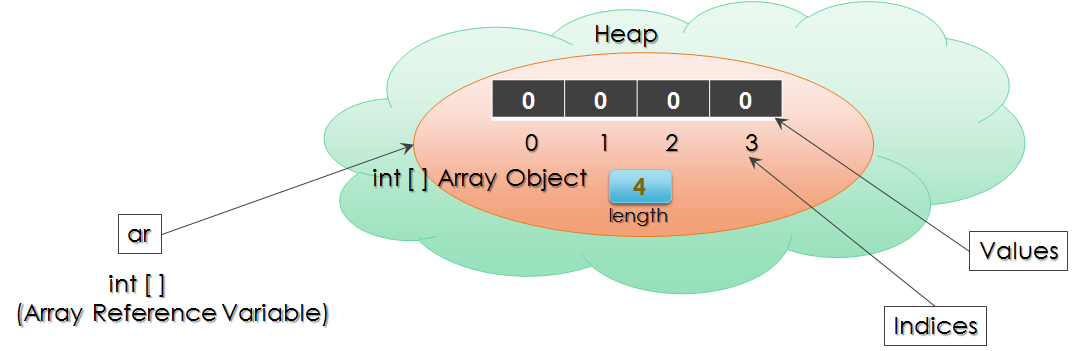
Array construction means creating the actual array object in memory using the new keyword.
Java needs to know the size of the array at the time of construction.
int[] numbers;          // declaration
numbers = new int[4];   // construction, size is mandatory
This creates an integer array object that can store four integer values.
Array Initialization in Java
Array initialization means assigning values to array elements. Array elements are accessed using index numbers.
int[] numbers = new int[5];

numbers[0] = 10;
numbers[1] = 20;
numbers[2] = 30;
numbers[3] = 40;
numbers[4] = 50;0 to 4.
Default Values in Java Arrays
When an array is constructed, each element gets the default value of its data type.
| Array Type | Default Value |
|---|---|
int[] |
0 |
double[] |
0.0 |
boolean[] |
false |
char[] |
'\u0000' |
| Object reference array | null |
public class ArrayDefaultValues {
    public static void main(String[] args) {
        int[] numbers = new int[4];

        for (int i = 0; i < numbers.length; i++) {
            System.out.println(numbers[i]);
        }
    }
}
Output:
0
0
0
0
Code Explanation
new int[4]creates an integer array with four elements.- Each integer element gets default value
0. - The loop prints all values using the
lengthproperty.
length Property of Array
Every array has a length property that stores the size of the array.
Remember, length is a property, not a method, so do not write parentheses.
public class ArrayLengthExample {
    public static void main(String[] args) {
        int[] numbers = {10, 20, 30};
        System.out.println("Array size: " + numbers.length);
    }
}
Output:
Array size: 3
ArrayIndexOutOfBoundsException
If you try to access an index outside the valid range,
Java throws an ArrayIndexOutOfBoundsException.
public class ArrayIndexOutOfBoundsExceptionExample {
    public static void main(String[] args) {
        int[] numbers = {10, 20, 30};
        System.out.println(numbers[3]);
    }
}
Valid indexes are 0, 1 and 2. Index 3 does not exist.
Single Dimensional Array in Java
A single dimensional array stores values in a linear form. It is the most common type of array.
public class SingleDimensionalArray {
    public static void main(String[] args) {
        int[] numbers = new int[5];

        numbers[0] = 10;
        numbers[1] = 20;
        numbers[2] = 30;
        numbers[3] = 40;
        numbers[4] = 50;

        for (int i = 0; i < numbers.length; i++) {
            System.out.println(numbers[i]);
        }
    }
}
Output:
10
20
30
40
50
Code Explanation
new int[5]creates an array with five integer elements.- Values are assigned from index
0to4. - The
forloop starts from index0. numbers.lengthis used to avoid hardcoding the array size.- Each element is printed using
numbers[i].
Different Ways to Declare, Create and Initialize Arrays
Java supports different ways to declare, instantiate and initialize arrays.
int[] arr1;
arr1 = new int[5];

int[] arr2 = new int[5];

int[] arr3 = {10, 20, 30};

int[] arr4 = new int[] {10, 20, 30};int[] arr3 = {10, 20, 30}; is a short and commonly used way to declare and initialize an array.
for-each Loop with Array
A for-each loop is useful when you want to read all elements of an array without using indexes.
public class ForEachArrayExample {
    public static void main(String[] args) {
        int[] numbers = {10, 20, 30};

        for (int number : numbers) {
            System.out.println(number);
        }
    }
}
Output:
10
20
30
Passing Array to Method in Java
Arrays can be passed to methods. This is useful when you want a method to process all elements of an array. Your old example for finding sum of array elements fits perfectly here.
public class ArraySumUsingMethod {
    static void getSum(int[] numbers) {
        int sum = 0;

        for (int number : numbers) {
            sum = sum + number;
        }

        System.out.println("SUM = " + sum);
    }

    public static void main(String[] args) {
        int[] values = {1, 2, 3};
        getSum(values);
    }
}
Output:
SUM = 6
Code Explanation
valuesis an integer array with values1, 2, 3.getSum(values)passes the array to the method.- The method receives the array in
int[] numbers. - The for-each loop reads each element.
- The sum is calculated and printed as
6.
Multidimensional Array in Java
A multidimensional array is an array of arrays. The most common multidimensional array is a two-dimensional array.
int[][] matrix;
int matrix2[][];
int[] matrix3[];
Recommended style is int[][] matrix;.
public class TwoDimensionalArray {
    public static void main(String[] args) {
        int[][] numbers = {
            {1, 2, 3},
            {4, 5, 6},
            {5, 7, 8}
        };

        for (int i = 0; i < numbers.length; i++) {
            for (int j = 0; j < numbers[i].length; j++) {
                System.out.print(numbers[i][j] + " ");
            }
            System.out.println();
        }
    }
}
Output:
1 2 3
4 5 6
5 7 8
Code Explanation
numbersis a two-dimensional array.- Each inner pair of braces represents one row.
- The outer loop controls rows.
- The inner loop controls columns of the current row.
numbers[i][j]accesses each element.
Jagged Array in Java
A jagged array is a two-dimensional array where each row can have a different length. In Java, this is possible because multidimensional arrays are arrays of arrays.
public class JaggedArrayExample {
    public static void main(String[] args) {
        int[][] numbers = new int[3][];

        numbers[0] = new int[] {1, 2, 3};
        numbers[1] = new int[] {4, 6};
        numbers[2] = new int[] {7, 8, 9, 10};

        for (int i = 0; i < numbers.length; i++) {
            for (int j = 0; j < numbers[i].length; j++) {
                System.out.print(numbers[i][j] + " ");
            }
            System.out.println();
        }
    }
}
Output:
1 2 3
4 6
7 8 9 10
Code Explanation
new int[3][]creates three rows, but column sizes are not fixed yet.- Each row is initialized separately with a different length.
numbers[0]has 3 elements.numbers[1]has 2 elements.numbers[2]has 4 elements.
Array of Objects in Java
Java arrays can also store object references. For example, you can create an array of Student objects.
class Student {
    String name;

    Student(String name) {
        this.name = name;
    }
}

public class ArrayOfObjectsExample {
    public static void main(String[] args) {
        Student[] students = new Student[3];

        students[0] = new Student("Ayan");
        students[1] = new Student("Rahul");
        students[2] = new Student("Sara");

        for (Student student : students) {
            System.out.println(student.name);
        }
    }
}
Output:
Ayan
Rahul
Sara
Common Mistakes with Java Arrays
- Accessing an index outside the valid range.
- Forgetting that array index starts from
0. - Using
length()instead oflength. - Trying to change array size after creation.
- Forgetting to initialize object elements in an object array.
- Using fixed loop limits instead of
array.length.
Arrays at a Glance
| Concept | Description |
|---|---|
| Array | Collection of same type values |
| Index | Starts from 0 |
| Size | Fixed after creation |
| length | Stores array size |
| Single Dimensional | One row of elements |
| Multidimensional | Array of arrays |
| Jagged Array | Rows with different lengths |
- An array stores multiple values of the same data type.
- Arrays are objects in Java.
- Arrays can store primitive values or object references.
- Array indexes start from
0. - The
lengthproperty stores the size of an array. - Java supports single dimensional, multidimensional, and jagged arrays.
- Arrays can be passed to methods.
Frequently Asked Questions
🧠 Test your understanding with a quick quiz
🚀 Quick Knowledge Check
Topic: Arrays | Language: Java
Q1. What is a jagged array in Java?
Q2. What is an array in Java?
Q3. Are arrays objects in Java?
Q4. What will be the output of this code?
public class Test {
    public static void main(String[] args) {
        int[] numbers = {10, 20, 30};
        System.out.println(numbers[1]);
    }
}Q5. Which is the recommended declaration for a two-dimensional int array?
Q6. Can Java arrays store object references?
Q7. If an array has size 5, what is the last valid index?
Q8. What is a multidimensional array in Java?
Q9. Which statement correctly creates a jagged array with 3 rows?
Q10. What will be the output of this code?
public class Test {
    public static void main(String[] args) {
        int[] numbers = {10, 20, 30};
        System.out.println(numbers.length);
    }
}Q11. What does the length property store in a Java array?
Q12. What will be the output of this code?
public class Test {
    public static void main(String[] args) {
        int[] numbers = new int[2];
        System.out.println(numbers[0]);
    }
}Q13. What happens if we access an invalid array index?
Q14. Which is the correct way to get array size in Java?
Q15. Which statement creates an integer array of size 5?
Q16. What is the default value of elements in a boolean array?
Q17. Which loop is commonly used to read all elements of an array without indexes?
Q18. What is the default value of elements in an int array?
Q19. Which is the recommended way to declare an int array in Java?
Q20. Can the size of a Java array be changed after creation?
Q21. What is the default value of elements in an object reference array?
Q22. Can an array be passed to a method in Java?
Q23. At which index does a Java array start?
Q24. What is a common mistake with Java arrays?
🎉 Great job! Continue learning Java step by step.