Java For Loop - Syntax, Flowchart and Examples
⏱️ 7 min read • Beginner Level • Lesson 28
Completed on . You can revise this lesson or continue to the next topic.
The for loop in Java is used to execute a block of code repeatedly for a specific number of times. It is commonly used when the number of iterations is already known.
Before learning the for loop, you should understand
Java while loop,
Java do-while loop, and
Java operators.
What is For Loop in Java?
A for loop is a repetition control structure that allows you to write
a loop compactly. It is mostly used when you know how many times a statement or block
of statements should execute.
-
A
forloop is best for counter-based repetition. -
Initialization, condition, and update are written in one line.
-
It is commonly used for printing patterns, tables, arrays, and repeated tasks.
Syntax of for Loop
A for loop has three main parts: initialization, condition, and update.
for (initialization; condition; update) {
    // loop body
}initialization runs once, the condition is checked before every iteration,
and the update runs after each iteration.
Flowchart of for Loop
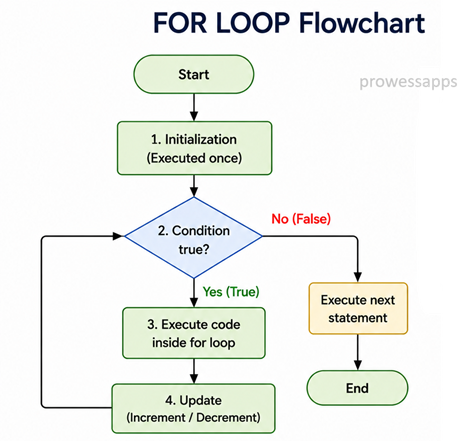
The following diagram shows how a for loop works. Java initializes the loop variable, checks the condition, executes the loop body, updates the variable, and then repeats.
How does it work?
- Java first executes the initialization statement.
- Then it checks the loop condition.
- If the condition is
true, the loop body executes. - After the loop body, the update statement executes.
- The condition is checked again before the next iteration.
- When the condition becomes
false, the loop stops.
Real-World Uses of for Loop
- Printing multiplication tables.
- Processing arrays and collections.
- Generating reports.
- Creating patterns and shapes.
- Repeating a task a fixed number of times.
Java for Loop Example
The following program prints Hello five times using a for loop.
public class ForDemo {
    public static void main(String[] args) {
        for (int i = 1; i <= 5; i++) {
            System.out.println(i + ". Hello");
        }
    }
}
Output:
1. Hello
2. Hello
3. Hello
4. Hello
5. Hello
Explanation
- The variable
iis initialized with value1. - The condition
i <= 5is checked before each iteration. - If the condition is true, the loop body prints the value of
iwithHello. - After each iteration,
i++increases the value ofiby1. - When
ibecomes6, the condition becomes false and the loop stops.
Example: Sum of First 5 Numbers
The following program calculates the sum of numbers from 1 to 5.
public class SumForLoop {
    public static void main(String[] args) {
        int sum = 0;

        for (int i = 1; i <= 5; i++) {
            sum = sum + i;
        }

        System.out.println("Sum = " + sum);
    }
}
Output:
Sum = 15
Example: Reverse Counting using for Loop
A for loop can also count backward by using a decrement operation.
public class ReverseForLoop {
    public static void main(String[] args) {
        for (int i = 5; i >= 1; i--) {
            System.out.println(i);
        }
    }
}
Output:
5
4
3
2
1
Example: Factorial using for Loop
public class FactorialExample {
    public static void main(String[] args) {

        int number = 5;
        int factorial = 1;

        for(int i = 1; i <= number; i++) {
            factorial = factorial * i;
        }

        System.out.println("Factorial of " + number + " = " + factorial);
    }
}
Output:
Factorial of 5 = 120
Explanation of Factorial using for Loop
-
The variable
numberstores the number whose factorial needs to be calculated. -
The variable
factorialis initialized to1because factorial calculation starts with multiplication by 1. -
The
forloop starts fromi = 1and runs untili <= number. -
During each iteration, the current value of
factorialis multiplied byi. -
For
number = 5, the calculations are:
                    1 × 1 = 1

                    1 × 2 = 2

                    2 × 3 = 6

                    6 × 4 = 24

24 × 5 = 120 -
After the loop finishes, the final value of
factorialbecomes120. -
The program then displays:
Factorial of 5 = 120.
A factorial is the product of all positive integers from
1 to the given number.
For example, 5! = 5 × 4 × 3 × 2 × 1 = 120.
Example: Multiplication Table using for Loop
The following program prints the multiplication table of 5.
public class MultiplicationTable {
    public static void main(String[] args) {
        int number = 5;

        for (int i = 1; i <= 10; i++) {
            System.out.println(number + " x " + i + " = " + (number * i));
        }
    }
}
Output:
5 x 1 = 5
5 x 2 = 10
5 x 3 = 15
5 x 4 = 20
5 x 5 = 25
5 x 6 = 30
5 x 7 = 35
5 x 8 = 40
5 x 9 = 45
5 x 10 = 50
Nested for Loop Preview
A for loop can be placed inside another for loop. This is called a nested for loop and is commonly used for patterns, tables, and matrix operations.
for(int row = 1; row <= 3; row++) {
    for(int col = 1; col <= 3; col++) {
        System.out.print("* ");
    }
    System.out.println();
}
Output:
* * *
* * *
* * *
Infinite for Loop
An infinite for loop happens when the condition never becomes false. Java also allows all three parts of a for loop to be omitted.
public class InfiniteForLoop {
    public static void main(String[] args) {
        for (;;) {
            System.out.println("This loop runs forever");
        }
    }
}false.
Difference Between for Loop and while Loop
| for Loop | while Loop |
|---|---|
| Best when the number of iterations is known. | Best when the number of iterations is not known. |
| Initialization, condition, and update are written in one place. | Initialization, condition, and update are usually written separately. |
| Commonly used for counters, arrays, and tables. | Commonly used for condition-based repetition. |
Common Mistakes in for Loop
- Forgetting to update the loop variable.
- Writing a condition that never becomes false.
- Using incorrect comparison operators.
- Adding an unwanted semicolon after the for statement.
- Changing the loop variable incorrectly inside the loop body.
When should you use a for loop instead of a while loop?
Use a for loop when the number of iterations is known in advance. Use a while loop when the number of iterations depends on a condition.
- The
forloop is used to repeat code a fixed number of times. - It contains initialization, condition, and update in one line.
- The condition is checked before each iteration.
- It is useful for counting, tables, arrays, and repeated tasks.
- An infinite for loop can be written as
for (;;).
Interview Questions ⭐
🧠 Test your understanding with a quick quiz
🚀 Quick Knowledge Check
Topic: For-loop | Language: Java
Q1. Which syntax creates an infinite for loop?
Q2. What is a common mistake in a for loop?
Q3. What is the output of this code?
for (int i = 5; i >= 1; i--) {
    System.out.println(i);
}Q4. When is a for loop usually preferred over a while loop?
Q5. How many times will this loop execute?
for (int i = 1; i <= 5; i++) {
    System.out.println("Hello");
}Q6. What is the main purpose of a for loop in Java?
Q7. Which are the three main parts of a for loop?
Q8. What will be the output of this code?
for (int i = 1; i <= 3; i++) {
    System.out.println(i);
}Q9. What does the update expression do in a for loop?
Q10. Which statement is true about the initialization part of a for loop?
🎉 Great job! Continue learning Java step by step.
Have you completed this lesson?
Mark this lesson as completed to track your learning progress. To keep track across devices, please login and save your learning progress.

Discussion
Ask questions, share suggestions, or discuss this lesson.