Java Nested If - Syntax, Examples and Explanation
⏱️ 7 min read • Beginner Level • Lesson 24
A nested if statement in Java means writing one
if statement inside another if or else block.
It is used when one condition should be checked only after another condition is true.
Before learning nested if, you should understand Java if statement, Java if-else statement, and Java if-else-if ladder.
What is Nested If in Java?
A nested if statement is an if statement placed inside another
if statement. The inner condition is checked only when the outer
condition is true.
-
Nested if is useful when a condition depends on another condition.
-
The inner
ifblock executes only if the outer condition is true. -
Nested if can be used with
if,if-else, andelseblocks.
Syntax of Nested If Statement
The syntax of nested if contains one if statement inside another
if block.
if (condition1) {
    // executes when condition1 is true

    if (condition2) {
        // executes when both condition1 and condition2 are true
    }
}if condition is checked only when
the outer if condition is true.
Flowchart of Nested If
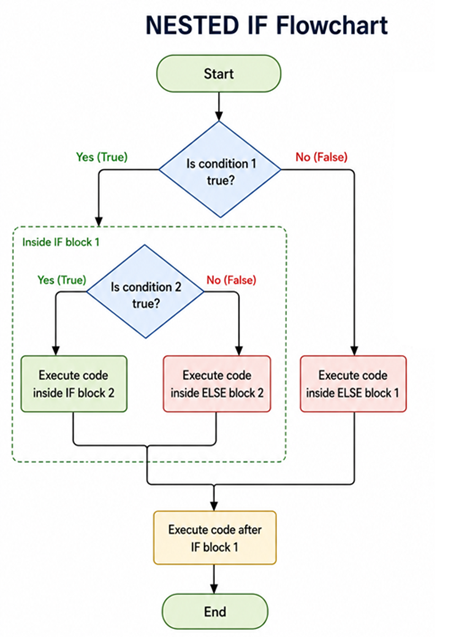
Execution flow of a nested if statement
How does Nested If work?
- Java first checks the outer
ifcondition. - If the outer condition is
false, the inner condition is not checked. - If the outer condition is
true, Java enters the outer block. - Then Java checks the inner
ifcondition. - If the inner condition is also
true, the inner block executes.
Nested If Example in Java
The following program checks whether a number is a natural number.
If it is greater than 0, then it checks whether the number is even or odd.
import java.util.Scanner;

public class NestedIfExample {
    public static void main(String[] args) {
        Scanner sc = new Scanner(System.in);

        System.out.print("Enter any number: ");
        int x = sc.nextInt();

        if (x > 0) {
            if (x % 2 == 0) {
                System.out.println("X is EVEN");
            } else {
                System.out.println("X is ODD");
            }
        } else {
            System.out.println("Not a Natural Number");
        }

        sc.close();
    }
}
Sample Input 1:
12
Output 1:
Enter any number:12
X is EVEN
Sample Input 2:
3
Output 2:
Enter any number:3
X is ODD
Sample Input 3:
-12
Output 3:
Enter any number:-12
Not a Natural Number
Explanation of the Program
- The program imports the
Scannerclass to read input from the keyboard. - A
Scannerobject namedscis created. - The user enters a number, and it is stored in variable
x. - The outer condition
x > 0checks whether the number is natural. - If
x > 0is true, the inner conditionx % 2 == 0is checked. - If the inner condition is true, the program prints
X is EVEN. - If the inner condition is false, the program prints
X is ODD. - If the outer condition is false, the program prints
Not a Natural Number. - The
Scannerobject is closed usingsc.close().
Another Example: Login Validation using Nested If
This example checks username first. If the username is correct, then it checks the password. This is a good real-life use case of nested if.
public class LoginValidationExample {
    public static void main(String[] args) {
        String username = "admin";
        String password = "12345";

        if (username.equals("admin")) {
            if (password.equals("12345")) {
                System.out.println("Login Successful");
            } else {
                System.out.println("Incorrect Password");
            }
        } else {
            System.out.println("Invalid Username");
        }
    }
}
Output:
Login Successful
Explanation of Login Validation Program
- The program stores
usernameas"admin". - The program stores
passwordas"12345". - The outer
ifchecks whether the username is correct. - If the username is correct, the inner
ifchecks the password. - If both username and password are correct, the program prints
Login Successful. - If the username is correct but password is wrong, it prints
Incorrect Password. - If the username itself is wrong, it prints
Invalid Username.
Difference Between Nested If and If-Else-If Ladder
| Nested If | If-Else-If Ladder |
|---|---|
| One condition is checked inside another condition. | Multiple conditions are checked one by one. |
| Useful when one condition depends on another. | Useful when there are multiple independent choices. |
| Can become harder to read if deeply nested. | Usually easier to read for multiple related conditions. |
| Example: login username then password check. | Example: grade calculation based on marks. |
Common Mistakes in Nested If
- Writing too many nested levels, making the code hard to read.
- Forgetting braces
{ }, especially when nesting conditions. - Using
=instead of==for comparison. - Using
==instead ofequals()for comparing strings. - Checking an inner condition that should be checked independently.
if-else-if ladder, or separate methods to make the code cleaner.
- Nested if means placing one
ifstatement inside another. - The inner condition is checked only if the outer condition is true.
- Nested if is useful when one condition depends on another condition.
- It is commonly used in validation, login checks, and multi-step decision-making.
- Avoid too much nesting because it can make code hard to read.
Frequently Asked Questions
🧠 Test your understanding with a quick quiz
🚀 Quick Knowledge Check
Topic: Nested-if | Language: Java
Q1. What will be the output?
String username = "admin";
String password = "12345";

if (username.equals("admin")) {
    if (password.equals("12345")) {
        System.out.println("Login Successful");
    } else {
        System.out.println("Incorrect Password");
    }
} else {
    System.out.println("Invalid Username");
}Q2. When is the inner if condition checked in nested if?
Q3. What will be the output of this code?
int x = -5;
if (x > 0) {
    if (x % 2 == 0) {
        System.out.println("Even");
    } else {
        System.out.println("Odd");
    }
} else {
    System.out.println("Not Natural");
}Q4. Which of the following is a good use case for nested if?
Q5. Which statement is true about nested if?
Q6. What is a common problem with too many nested if statements?
Q7. What will be the output of this code?
int x = 12;
if (x > 0) {
    if (x % 2 == 0) {
        System.out.println("Even");
    } else {
        System.out.println("Odd");
    }
} else {
    System.out.println("Not Natural");
}Q8. Which method should be used to compare strings in nested if conditions?
String username = "admin";
if (username.____("admin")) { }Q9. What is the main difference between nested if and if-else-if ladder?
Q10. What is nested if in Java?
🎉 Great job! Continue learning Java step by step.