Java Basics
Write and Run Your First Java Program
In this lesson, you will create a HelloWorld.java source file, compile it with
the javac command, run the compiled class with the java command, and
understand what happens at every step.
Quick answer
How do you write and run a Java program?
Save the source code in a file whose name matches the public class, such as
HelloWorld.java. Compile it with javac HelloWorld.java, which creates
HelloWorld.class. Then run the class with java HelloWorld without
adding the .class extension.
What you will learn
- What tools are needed to write and execute Java code.
- How to create a correctly named Java source file.
- How to compile source code with
javac. - How to run a compiled class with the
javalauncher. - What each line of the Hello World program means.
- How source code differs from Java bytecode.
Before you begin
Complete Java Environment Setup
and review Java Program Structure.
Confirm that both java -version and javac -version work in a new terminal.
What you need before writing a Java program
- A configured Java Development Kit (JDK) containing
javacandjava. - A text editor such as Notepad, Notepad++, VS Code, or gedit.
- Alternatively, a Java IDE such as BlueJ, NetBeans, Eclipse, or IntelliJ IDEA.
- A folder where you can save the source file and open a terminal.
Text editor or IDE?
A plain text editor makes the compile-and-run process easy to see. An IDE automates many steps, but the source-file, compiler, bytecode, and JVM concepts remain the same.
Steps to write and run a Java program
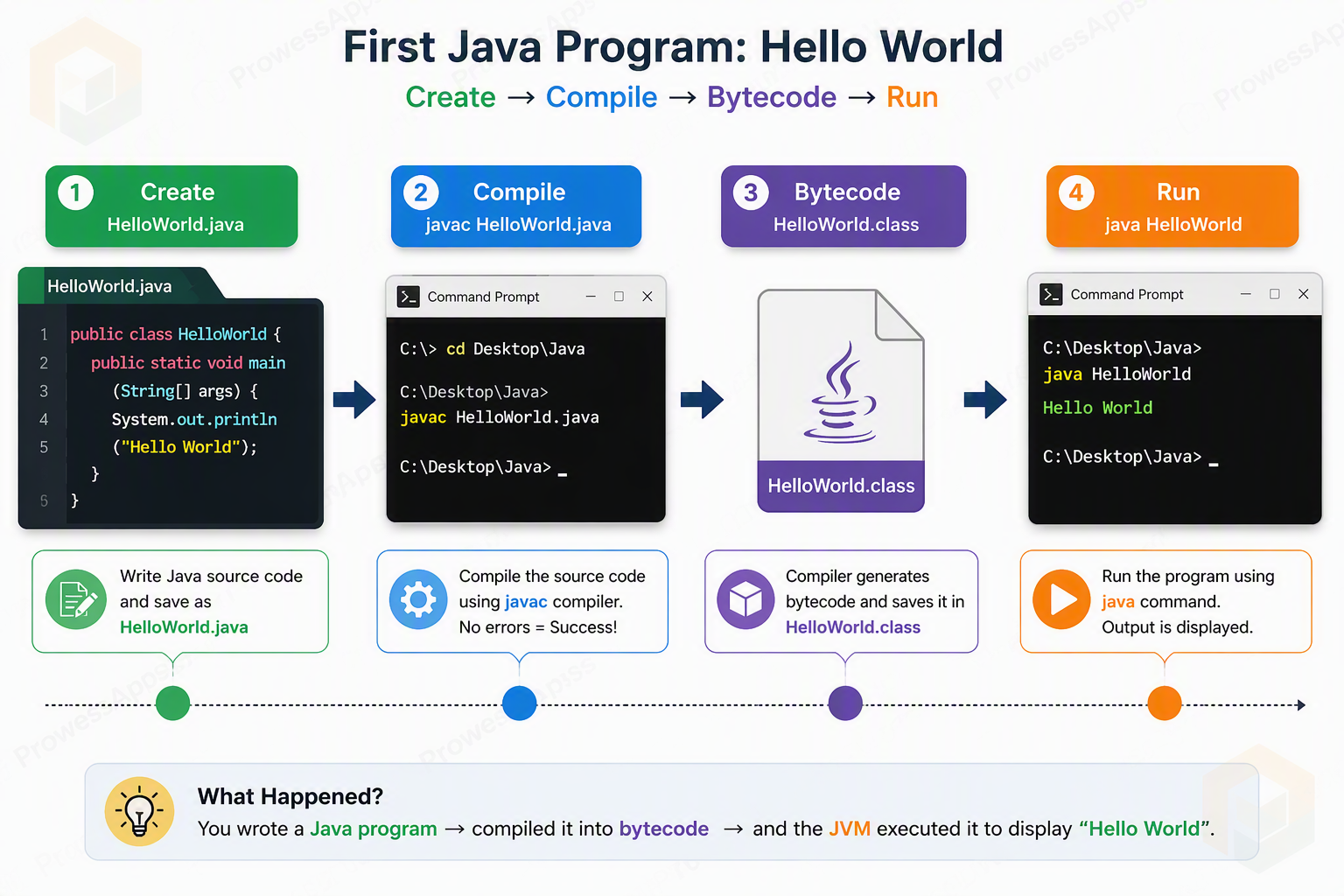
Writing and executing a Java program is typically a three-step process: writing the source code, compiling it into bytecode, and running it on the JVM.
Step 1: Create the Java source file
Open a text editor and save the following program as HelloWorld.java. The spelling
and letter case must match the public class name exactly.
public class HelloWorld {
    public static void main(String[] args) {
        System.out.println("Hello World");
    }
}
Expected Output
Hello WorldCheck the extension
Ensure the file is really named HelloWorld.java, not
HelloWorld.java.txt. Some operating systems hide known filename extensions.
Step 2: Compile the Java program
Open Command Prompt or a terminal, then use the cd command to navigate to the exact folder containing
HelloWorld.java. For example, if you saved the file on your Desktop, use:
cd DesktopCompile the source file with:
javac HelloWorld.java
If compilation succeeds, javac normally prints no success message. It creates
HelloWorld.class in the same folder. This file contains Java bytecode.
Step 3: Run the Java program
Run the compiled class by passing its class name to the Java launcher:
java HelloWorldOutput
Hello WorldDo not add .class
Use java HelloWorld, not java HelloWorld.class. The launcher expects
a binary class name rather than a class-file path in this basic example.
Modern Shortcut (Java 11+)
Since Java 11, you can compile and run a single-file program in one step using the command java HelloWorld.java. This executes the code in memory without creating a separate .class file, which is great for quick testing!
Explanation of the HelloWorld program
| Code part | Meaning |
|---|---|
public | Makes the class or method accessible where the Java launcher needs it. |
class | Declares a Java class. |
HelloWorld | Names the public class; the source file is therefore HelloWorld.java. |
static | Allows main() to run without first creating a HelloWorld object. |
void | Indicates that main() does not return a value. |
main | Names the conventional application entry-point method. |
String[] args | Receives command-line arguments. |
System.out.println() | Prints text followed by a new line. |
Java source code facts
- Java source code is written and maintained by the programmer.
- Java source files use the
.javaextension. - A source file can contain more than one top-level class, subject to Java's declaration rules.
- If a source file contains a public top-level class, the filename must match that class name.
package declaration;

import statements;

class ClassName {
    // class members
}
Java bytecode facts
- The Java compiler generates bytecode after successful compilation.
- Bytecode is stored in
.classfiles. - The class-file format enables the same compiled code to run on supported systems with compatible JVMs.
- The JVM loads, verifies, and executes the bytecode.
- Each compiled class normally has its own corresponding class file, including nested-class outputs where applicable.
Common first-program errors
If you encounter issues while compiling or running, check these common errors:
| Error Message | Solution |
|---|---|
'javac' is not recognized as an internal or external command |
Your system cannot find the Java compiler. Ensure you have installed the JDK and added the JDK's bin folder to your system's PATH variable. See Environment Setup. |
Error: Could not find or load main class HelloWorld |
This usually happens if you mistakenly run java HelloWorld.class instead of java HelloWorld, or if you run the command from the wrong folder. |
class HelloWorld is public, should be declared in a file named HelloWorld.java |
The file name does not match the class name. Make sure the file is named exactly HelloWorld.java (case-sensitive). |
java HelloWorld.classjava HelloWorldWhat’s next?
Continue with Java Comments to learn how to document code and temporarily disable statements while testing.
Lesson summary
- A Java source file is saved with the
.javaextension. - The public class name and source filename must match.
javac HelloWorld.javacompiles the source code.- Successful compilation creates
HelloWorld.classcontaining bytecode. java HelloWorldlaunches the compiled class on the JVM.- The run command uses the class name without the
.classextension.
Frequently asked questions
How do I compile my first Java program?
Open a terminal in the folder containing HelloWorld.java and run javac HelloWorld.java. If the code is valid, the compiler creates HelloWorld.class.
How do I run a compiled Java program?
Run the class with java HelloWorld. Use the class name and do not add the .class extension to this command.
Why must the filename be HelloWorld.java?
The program declares a public top-level class named HelloWorld, so Java requires the source filename to match that class name exactly and use the .java extension.
What is the difference between java and javac?
javac is the Java compiler that converts source code into bytecode. java is the launcher that starts a JVM and runs the compiled class.
Why does javac produce no output after compilation?
A successful javac command commonly produces no terminal message. Check the folder for the generated .class file. Compiler errors are displayed when compilation fails.
What is a .class file?
A .class file contains Java bytecode generated by the compiler. A compatible JVM can load and execute that bytecode.
Check your knowledge
Free learner features
Save your learning progress
Sign in to mark lessons as completed, save your Java learning progress across devices, and participate in lesson discussions.
Sign in to track progressDiscussion
Ask questions, share suggestions, or discuss this lesson.
No approved comments yet. Start the discussion by asking a helpful question.
